
Having tried this with a Raspberry Pi Pico (and had some odd issues with a RPi V4) I wanted to give it a go with an Arduino too. The basics have already been covered before, so this is relatively quick to set up.
Warning! I strongly recommend using old or second hand equipment for your experiments. I am not responsible for any damage to expensive instruments!
These are the key Arduino tutorials for the main concepts used in this project:
If you are new to Arduino, see the Getting Started pages.
Parts list
- Arduino Uno or Nano
- For USB MIDI: Arduino compatible Pro Micro (or other ATmega32U4 board)
- 4 or 8 simple push buttons
- For serial MIDI: MIDI interface
- Breadboard and jumper wires
The Circuit
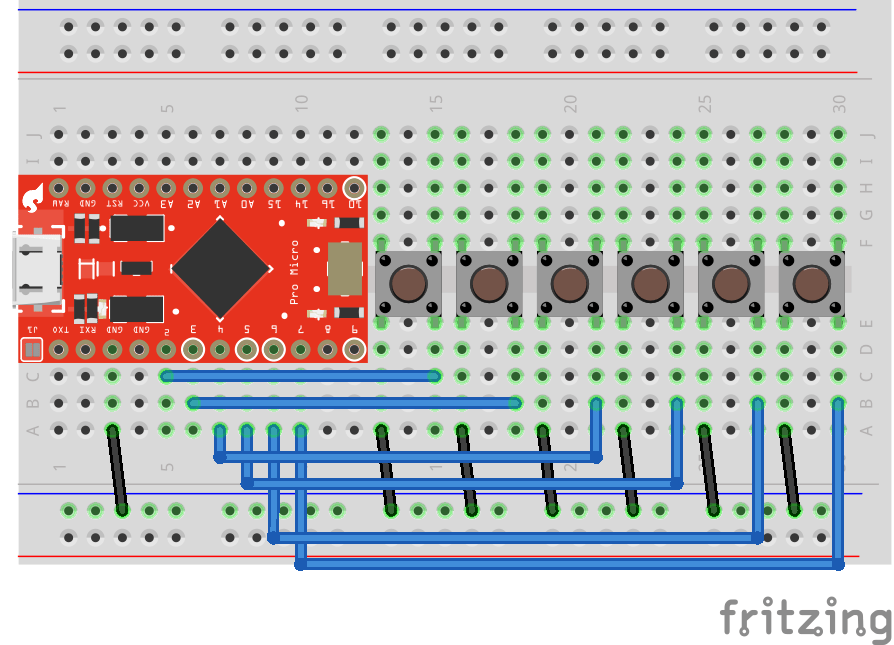
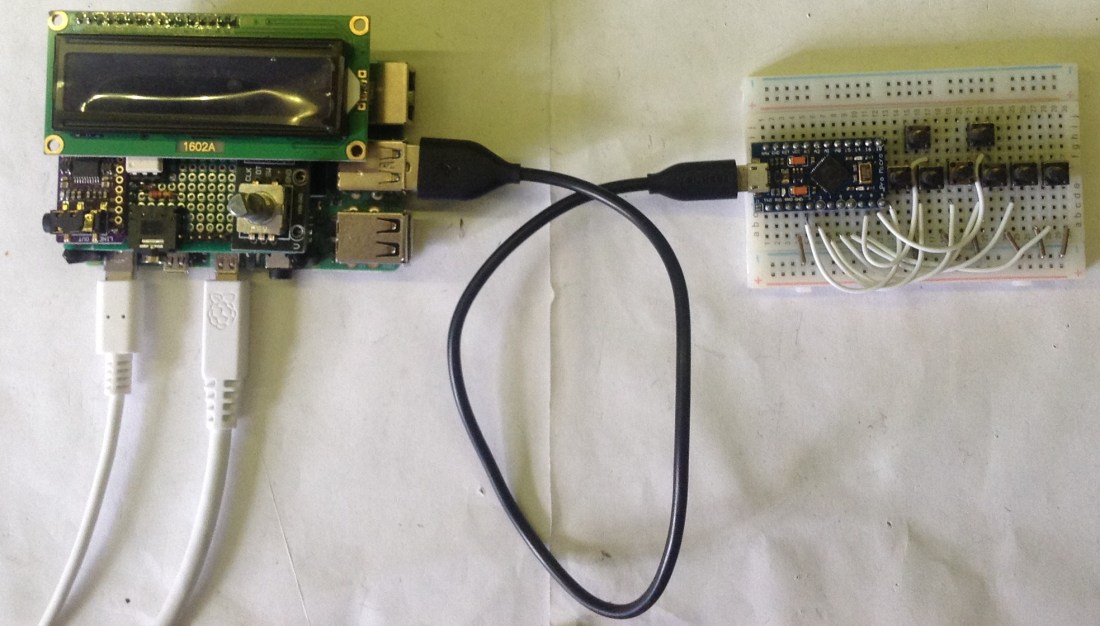
I particularly want a USB MIDI button controller, so I’m using a Sparkfun Arduino compatible Pro Micro, but any ATmega32U4 based device would do the trick. If you’re not bothered about USB MIDI and are fine with serial MIDI then any Arduino would do, just connect up an Arduino MIDI Interface to the TX, power and GND and you’re all set.
Each button is connected between an IO pin and GND, so all inputs will be configured for INPUT_PULLUP mode.
The Code
The basic algorithm is the same as for the CircuitPython Pico version as described previously. There is conditional compilation at the top of the file to exclude MIDI USB if you’re not using a “native USB” Arduino device like the ATmega32U4.
There is a list of pins to be used with the buttons and a list of BANKSEL LSB and MSB values to be use with each button. By default the code is built for 6 buttons on D2 to D7, but in the photo you can see I’ve used 8 buttons on D2 to D9.
Closing Thoughts
The MiniDexed on a Pi 4 seems much happier with the Arduino USB version for some reason! Either way, I now have the choice of both platforms.
Kevin

 Simple DIY Electronic Music Projects
I’m sorry, would you kindly explain what each button does? 6 buttons select 6 banks?
Is there a way to combine the code so that some buttons change the banks and some would change voices/patches?
Thank you!
LikeLiked by 1 person
They each select a specific bank that’s all – it was deliberately pretty simple in that regard 🙂
Yes, it is quite possible to have buttons doing a mixture of MIDI related controls. Have a look at the code, I try to keep things fairly well documented in there and give me a shout if you get stuck.
LikeLike
4 buttons might cover most cases. +1 bank, -1 bank change, +1 voice/patch, -1voice patch. I wonder if there’s an easy way to adopt your code to achieve that. Planning to use it for Dexed as well.
LikeLike
Another option might be to look at this Pico version: https://diyelectromusic.wordpress.com/2022/05/20/pi-pico-midi-button-voice-select/
This has both bank select and pgm change. But if you want an up/down style interface, then it will need a bit of adjustment, but all the principles are in there somewhere or elsewhere on my blog. Have a search for banksel (the MIDI bank select message) or program change (the MIDI voice change messages) and see what comes up.
Kevin
LikeLike