
I’ve finally returned to having a look at my Arduino OPL FM Synth. This time I’m taking a look at the drum channels.
Warning! I strongly recommend using old or second hand equipment for your experiments. I am not responsible for any damage to expensive instruments!
These are the key Arduino tutorials for the main concepts used in this project:
- Majic Designs – Making Music with a Yamaha YM2413 Synthesizer
- Arduino OPL FM Synth
- Arduino OPL FM Synth – Part 2
If you are new to Arduino, see the Getting Started pages.
Parts list
- Arduino Uno
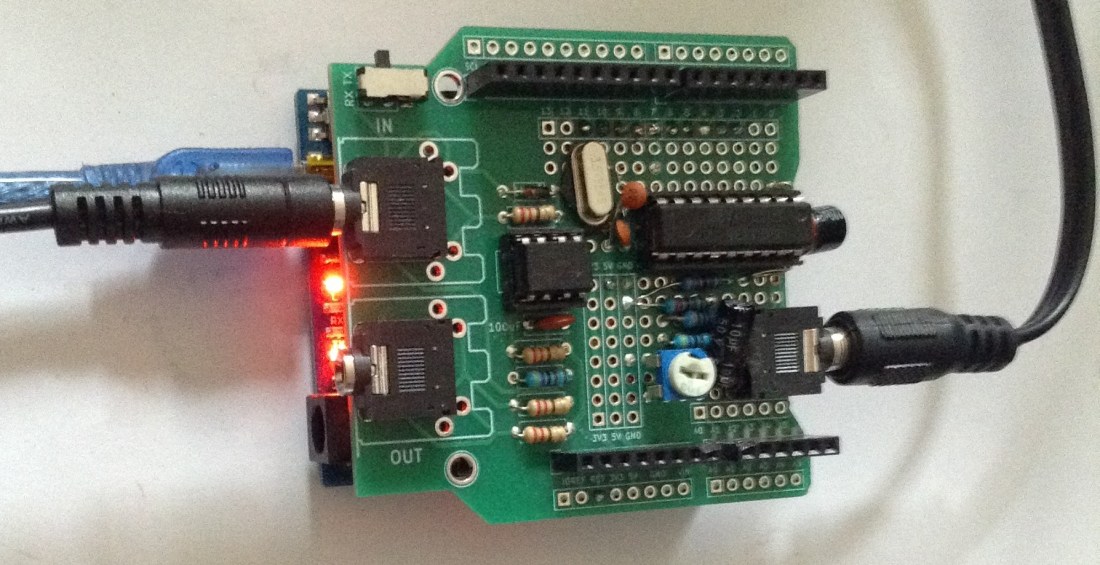
- YM2413 shield from either of my previous posts: part 1 or part 2
- One of the Ready-Made MIDI Modules or Arduino MIDI Interfaces
- Protoboard or breadboard and jumper wires
The Circuit
Some means of connecting the YM2413 to the Arduino Uno is required. I’m not going to go over that again here, but here are three options:
- Solderless breadboard as described in Arduino OPL FM Synth.
- Protoshield PCB as described in Arduino OPL FM Synth – Part 2
- MD Designs shield as described here.
Each has a slightly different pin-interface to the Arduino.
The Code
Once again I’m using the library from https://github.com/MajicDesigns/MD_YM2413 which will be initialised in one of the following three ways, depending on the shield option being used…
// Arduino pins conneced to the YM2413:
// D_PIN = Arduino pins for D0 to D7 of the YM2413
// WE_PIN = Arduino pin for WE of the YM2413
// A0_PIN = Arduino pin for A0 of the YM2413
// Note CS of the YM2413 is connected to GND
//
//const uint8_t D_PIN[] = { 8, 9, 7, 6, A0, A1, A2, A3 };
//const uint8_t D_PIN[] = { 8, 9, 7, 6, 13, 12, 11, 10 };
//const uint8_t WE_PIN = 5;
//const uint8_t A0_PIN = 4;
const uint8_t D_PIN[] = { 3, 2, 4, 5, 6, 7, 8, 9 };
const uint8_t WE_PIN = 10;
const uint8_t A0_PIN = 11;
I’m using the last configuration which corresponds to the home-made shield I built in part 2.
To get the YM2413 to do percussion requires enabling percussion mode, which then sacrifices some of the melody channels to give five percussion channels. Each percussion channel has a fixed associated with a specific percussion instrument: bass drum, snare drum, tom, cymbal, hi-hat.
In terms of responding to MIDI, the General MIDI drum instrument set has to be mapped onto these five instruments. Then in terms of playing them, the YM2413 has to be instructed to play, well, any note on the appropriate channel for that instrument.
Using the MD_YM24213 library, these are the main elements required (this won’t compile and run itself, it is just the highlights from the main code):
#include <MIDI.h>
#include <MD_YM2413.h>

MIDI_CREATE_DEFAULT_INSTANCE();
MD_YM2413 SYNTH(D_PIN, WE_PIN, A0_PIN);

const uint8_t drums[32] = {
/* 35-40 */ BD, BD, NO, SD, NO, SD,
/* 41-50 */ TT, HH, TT, HH, TT, HH, TT, TT, CY, TT,
/* 51-60 */ CY, CY, NO, NO, CY, NO, CY, NO, SD, SD,
/* 61-66 */ SD, SD, SD, SD, SD, SD
};

void handleNoteOn(byte channel, byte pitch, byte velocity) {
  uint8_t drum = drums[pitch-35];
  if (drum != NO) {
    SYNTH.noteOn(drum, MD_YM2413::MIN_OCTAVE, 0, MD_YM2413::VOL_MAX, 0);
  }
}

void handleNoteOff(byte channel, byte pitch, byte velocity) {
  uint8_t drum = drums[pitch-35];
  if (drum != NO) {
    SYNTH.noteOff(drum);
  }
}

void setup() {
  SYNTH.begin();
  SYNTH.setPercussion(true);
  MIDI.setHandleNoteOn(handleNoteOn);
  MIDI.setHandleNoteOff(handleNoteOff);
  MIDI.begin(10);
}

void loop(void)
{
  MIDI.read();
  SYNTH.run();
}
The Arduino MIDI library is used to set up handlers for NoteOn and NoteOff messages which will result in getting the YM2413 synth playing the appropriate drums. To work out which YM2413 drum to use there is a map between GM drum instruments (I’m started with 35, bass drum) and the five YM2413 voices. Any sounds that really don’t map over are left as “NO” instrument and will be ignored. The put the YM2413 into percussion mode requires a call to setPercsussion().
Closing Thoughts
I did wonder about including some button handling to make the whole thing stand-alone, but there are many other projects already here on my blog with the requisite parts to allow that to happen, so to demonstrate the YM2413 I kept to MIDI only.
I’d quite like to pair this up somehow with my MiniDexed to give a complete FM synth + rhythm setup.
Kevin


Kevin,
I’ve been following your excellent blog for some time now and have successfully recreated a number of your projects (and learned a lot along the way!). Unfortunately, however, I’m having trouble with the OPL FM Synth…particularly the drum sounds. When the YM2413 is in rhythm mode, I’m not getting drum or cymbal sounds at all, just sort of random bloops and bleeps–some pitched and some unpitched. I have a number of YM2413 chips I’ve obtained from different sources, and switching out the chip doesn’t make a difference (my project is on a breadboard). Outside of rhythm mode, everything works as you’d expect. Any ideas or suggestions? Thanks!
Peter
LikeLike
Nothing is instantly springing to mind I’m afraid. I guess things I’d be checking include making sure I’ve really enabled percussion mode; if using my code, then drop back to the simplest thing to test what you’re after – ie lose the midi stuff and just output a regular drum sound; check the clock handling in the circuit with a scope; output a 440Hz wave you can check with an oscilloscope but also a real instrument, tuning fork, or tuner (as it is a concert A)…
That kind of thing?
I guess I’m thinking, I don’t know why drums won’t work if other things don’t… So really make sure everything else is working right?
Also doesn’t the drum section have its own audio out pin? Are pitch and rhythm outputs mixed sensibly?
Good luck!
Kevin
LikeLike
Thanks for your reply, Kevin. I’ve pared the code down to the very minimum and am still getting the same incorrect result. So, I’m starting to wonder now if there is a problem with the clock as you suggested…I think I’ve replaced or rewired every other component at some point, so I’ll try there next. I’ll let you know if I get it going.
Peter
LikeLiked by 1 person