
Last year I programmed up an Arduino with my Pi Day MIDI Sequencer to play a short extract from Philip Glass’ Einstein on the Beach. You can read all about that here: Minimalist Lo-Fi Minimalism.
Having spent a fair bit of the time since then playing around with an Arduino and SP0256A-AL2 and finally getting it hooked up to MIDI, I parked an idle though that it might be interesting to get it “singing” part of Einstein on the Beach. This post comes back to that idea.
Warning! I strongly recommend using old or second hand equipment for your experiments. I am not responsible for any damage to expensive instruments!
These are the key Arduino tutorials for the main concepts used in this project:
- Minimalist Lo-Fi Minimalism
- SP0256A-AL2 Speech Synthesis
- Arduino and SP0256A-AL2 – Part 6
- Pi Day MIDI Sequencer
If you are new to Arduino, see the Getting Started pages.
Parts list
- 2x Arduino Uno
- Pi Day MIDI Sequencer
- Arduino SP0256A-AL2 Shield Design
The Circuit
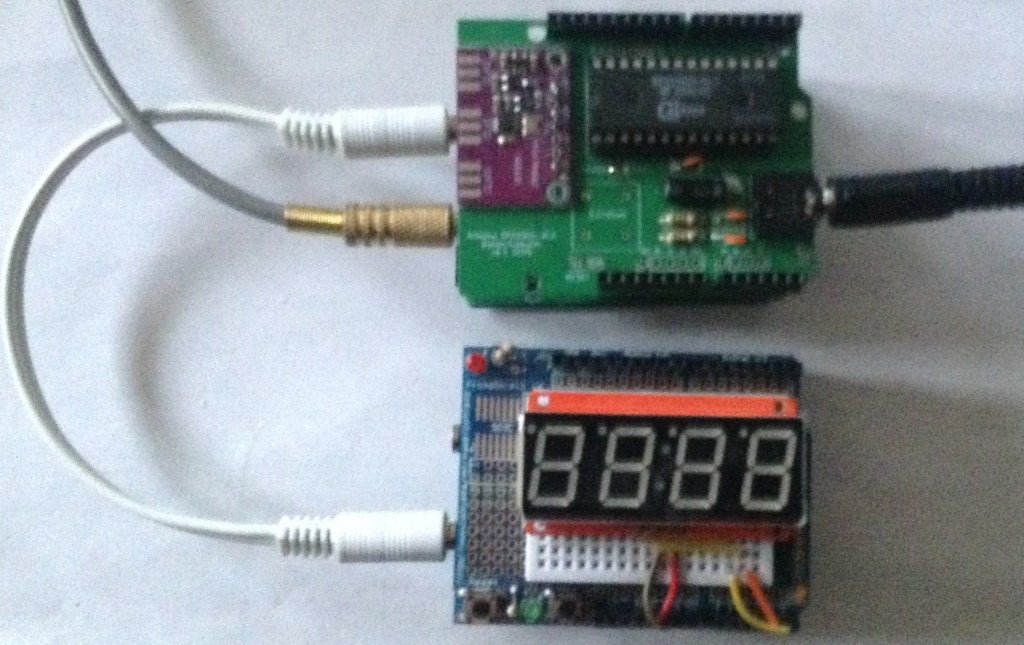
I did wonder about combining both the Pi Day sequencer and SP0256A-AL2 shield into a single device, but then decided it would be simpler to treat them as two separate devices and use MIDI to pass control between them.
Consequently I’ve ended up as follows:
- Pi Sequencer -> MIDI TRS -> SL0256A-AL2 -> MIDI TRS -> synth
Where the Pi sequencer is running the code for Minimalist Lo-Fi Minimalism with a small update to send additional MIDI messages to be interpreted by the SL0256A-AL2. All other MIDI is passed through the SL0256A onto a MIDI synth as before.
The Code
Having decided on the basic architecture, the next decision was how to encode the information destined for the speech synthesizer. I need to be able to tell it a pitch and a number to be “sung”. I toyed with the following ideas:
- MIDI NoteOn with pitch, but using note velocity to encode the number to sing.
- MIDI Program Control to select the number, then MIDI pitch and velocity as normal.
- Use the MIDI channel for the number, and pitch and velocity as normal.
I opted for the last option, treating each number as a different instrument on a different MIDI channel. This is a bit wasteful but was a lot easier for testing than attempting to get a specific velocity or having to send MIDI PC messages to keep reselecting the “voice” before each note.
As described previously in Minimalist Lo-Fi Minimalism MIDI channels 1,2 and 3 are already used for the bass and two voice lines, so I’m using MIDI channels 4 through to 13 for the numbers one to ten.
The code for the Glass already has pitch and which number encoded into the data structures. To trigger the “singing” via the speech synthesizer I’m using the Soprano voice pitches, but an octave lower, so it is a relatively simple matter of adding in an additional MIDI send as follows:
    MIDI.sendNoteOn(sop[i], 64, MIDI_CHANNEL_SOP);              // Original code
    MIDI.sendNoteOn(sop[i]-12, 64, MIDI_CHANNEL_NUM-1+num[i]);  // New code
    lastsop = sop[i];                                           // Original code
It is using the “NUM” MIDI channel – 1 as I’m encoding the numbers 1 to 10 which are stored in the num[] array. As the speech synthesis is essentially running at a fixed duration for each utterance, I’m not even bothering with a Note Off message.
On the speech synth side, again essentially all of the code is the same as for the Arduino and SP0256A-AL2 – Part 6 MIDI code, but instead of singing “do, re, mi”, etc linked to pitch, I need to take the word from the MIDI channel. To do this, I’ve expanded the speak() function to include the number and call it as follows from the NoteOn callback:
speak(channel-MIDI_CH2NUM, pitch);
This will result in a number from 1 to 10 and a MIDI pitch which can then be used to select the playback frequency as before and then say the allophones corresponding to the received number.
void speak (uint8_t num, uint8_t note) {
  midi2clock (note);
  switch(num){
    case 1:  // One
      spAllo(WW1);
      spAllo(AX1);
      spAllo(NN1);
      break;

    case 2:  // Two
      spAllo(TT2);
      spAllo(UW2);
      break;

  }
  spAllo(PA3);
}
The SP0256A-AL2 datasheet lists the allophones to use for the basic numbers.
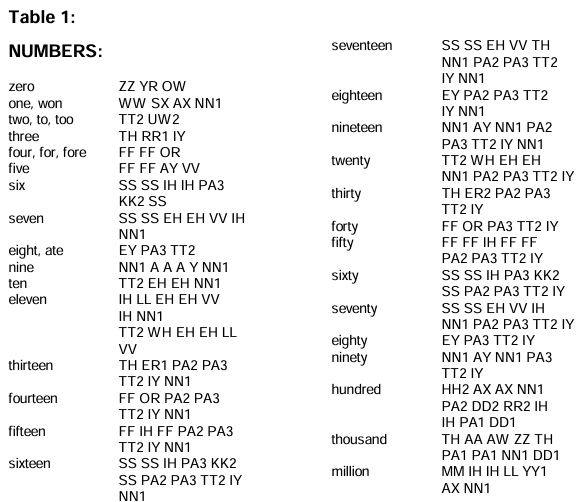
I’ve used, in a few cases, slightly shortened versions of the numbers from one to ten. In particular I’ve removed the duplicate allophones for six and seven to make them a little shorter to playback.
The allophones for “One” includes the use of “SX” but I can find no other mention of that in the datasheet, so I’ve ignored it.
One final change was to tweak the timings of the original playback. I’ve had to slow it down a lot to give the SP0256A-AL2 time to say each number, and I’ve also introduced a small delay between sending the MIDI messages and updating the numbers on the display to allow them to sync up a little better.
If the MIDI went to the synth directly from the Pi Day sequencer then a delay would probably be required there too, but as it has to go through the SP0256A-AL2 and get sent back out using the “software THRU” of the Arduino MIDI library, it has a natural slight delay already and isn’t too noticeably out of sync.
Closing Thoughts
I always knew there would be a few limitations, not least of which due to the time it takes to play back the allophones, but in essence I believe this works. I’d rather it was a little more up tempo, but sometimes one just has to work with what is available.
I think it is certainly keeping within the spirit of attempting an extract of the original opera on 8-bit microcontrollers, so it’s not doing too badly.
Kevin


