
So, now that the basics are out of the way I’m going to dive into the specifics of the Dream SAM2695 chip itself.
- Part 1 – Getting started and getting code running.
- Part 2 – Swapping the ESP32-C3 for a SAMD21 to get USB MIDI.
- Part 3 – Taking a deeper look at the SAM2695 itself.
- Part 4 – A USB MIDI Synth Module using the SAMD21 again as a USB MIDI Host.
- Part 5 – A Serial MIDI Synth Module using the original ESP32-C3.
- Part 6 – Pairs the Synth with a XIAO Expansion board to add display and potentiometers.
Warning! I strongly recommend using old or second hand equipment for your experiments. I am not responsible for any damage to expensive instruments!
These are the key tutorials for the main concepts used in this project:
- Getting Started with the XIAO MIDI Synthesizer
- XIAO SAMD21, Arduino and MIDI
- CircuitPython USB to Serial MIDI Router
- XIAO USB Device to Serial MIDI Converter
If you are new to microcontrollers, see the Getting Started pages.
The Dream SAM2695
I first encountered this device on a breakout board several years ago, called a “GM Mini Module”. Various tutorials at the time showed how to hook this up to an Arduino. For example, my specific module had the following suggested application:

The breakout was essentially just the SAM2695 with an additional MIDI IN circuit and DIN socket.
At the time it was a component of the “fluxamasynth” – an Arduino shield containing the chip. Whilst the shield is now discontinued, a number of resources still remain online about it: https://github.com/fluxly/Fluxamasynth
Since then there have been a number of modules released that use this neat synth chip, probably the most recognisable of which is perhaps the M5 MDI Synth: https://shop.m5stack.com/products/midi-synthesizer-unit-sam2695
There is also a M5 module with built-in MIDI DIN socket too.
This latest XIAO device follows in the footsteps of all these other variations but adds the microcontroller, and ESP32-C3, to make a complete “system”.
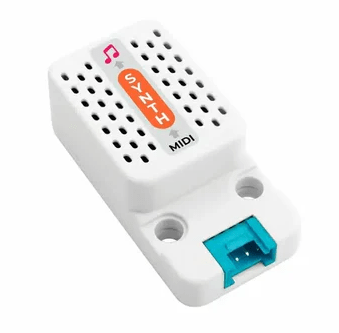
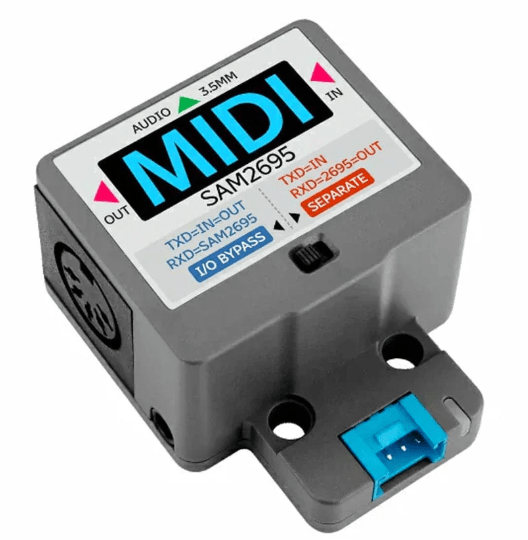
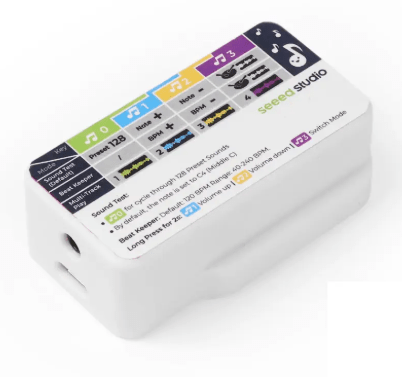
I happen to have three of these devices – the original Dream “GM mini module”, M5 synth and the XIAO, so I’ll do a post about them together at some point, but the all work in essentially the same way.
This series of posts is mostly taking a detailed look at the XIAO MIDI Synthesizer, but the following post shows how to use a XIAO SAMD21 to talk to the M5 Stack Synth: XIAO USB Device to Serial MIDI Converter.
The datasheet for the SAM2695 describes its capabilities:
- MIDI control processor, serial and parallel interface
- Synthesis, General MIDI wavetable implementation
- General MIDI compatible effects: reverb + chorus
- Spatial Effect
- 4-band stereo equalizer
- Stereo DAC. DR: 86dB typ, THD+N: -75dB typ
- Mike input. DR: 86dB typ, THD+N: -75dB typ
- Mike echo
- 64-voice polyphony (without effects)
- 38-voice polyphony + effects
- On-chip CleanWave™ wavetable data, firmware, RAM delay lines
- Audio stereo line output
Interestingly it supports a parallel or serial MIDI access. But using serial is by far the easiest as it can link up directly to another microcontroller’s UART or an opto-isolator of a standard MIDI IN circuit.
The GM Sound Engine
The SAM2695 has two complete instrument banks and a drum set. The banks are as follows:
- CH1-9,11-16: BANKSEL 0: Full General MIDI Sound set
- CH1-9,11-16: BANKSEL 127: MT-32 Compatible Sound set
- CH10: General MIDI Drum Sound set:
- Program 1: Normal kit, notes 35-81
- Program 17: “Power Set”, Normal set + note 38 only
- Program 41: “Brush”, Normal set + notes 35-40 changed
- Program 49: “Orchestra”, Normal set + notes 27-30, 38-53, 88 changed
- Program 128: “CM 64/32 Partial”, range of effects and things – MT-32 like
The device also supports effects and an equaliser. All additional controls are configured using either MIDI NRPN or SysEx message. And there are a lot of messages defined in the datasheet!
There are also a number of control messages which apparently have to be sent over the parallel data interface.
But what I am most interested in is the MIDI implementation for the common range of MIDI messages, the most useful of which (to me) are listed below.
| MIDI Message | HEX | Notes | Compatibility |
| Note On | 9n kk vv | MIDI | |
| Note Off | 8n kk vv | MIDI | |
| Pitch Bend | En ll hh | 14-bit pitch bend data hhll | GM |
| Program Change | Cn pp | GM/GS | |
| Channel Aftertouch | Dn vv | MIDI | |
| Control Change | Bn cc dd | See table below for specific control change messages | |
| RPN | Bn 65 … | Registered parameter numbers (see datasheet) | MIDI/GM |
| NRPN | Bn 63 … | Non-registered parameter numbers (see datasheet) | GS/DREAM |
| SysEx | F0 7E 7F 09 01 F7 | MIDI Reset | GM |
| SysEx | F0 7F 7F 04 01 00 vv F7 | Master volume | GM |
| SysEx | F0 41 00 42 12 … F7 | Range of GS specific SysEx messages (see datasheet) | GS |
| SysEx | F0 00 20 00 00 … F7 | Dream specific “port write” command | DREAM |
MIDI Control Change Messages
| Command | HEX | Defaults / Notes |
| Bank Select | Bn 00 cc | 0 |
| Modulation | Bn 01 cc | 0 (Rate/Depth set via SysEx) |
| Portamento Time | Bn 05 cc | |
| Channel Volume | Bn 07 cc | 100 |
| Pan | Bn 0A cc | 64 |
| Expression | Bn 0B cc | 127 |
| Sustain Pedal | Bn 40 cc | 0 (>63 ON) |
| Portamento | Bn 41 cc | 0 (>63 ON) |
| Sostenuto Pedal | Bn 42 cc | 0 (>63 ON) |
| Soft Pedal | Bn 43 cc | 0 (>63 ON) |
| Reverb | Bn 50 vv | 4 (0..7 = reverb effects) |
| Chorus | Bn 51 vv | 2 (0..7 = chorus effects) |
| Reverb Send | Bn 5B vv | |
| Chorus Send | Bn 5D vv | |
| All Sound Off | Bn 78 00 | |
| Reset All Controllers | Bn 79 00 | |
| All Notes Off | Bn 7B 00 | |
| Mono On | Bn 7E 00 | |
| Poly On | Bn 7F 00 | Defaults to poly on power up |
| CC1 | Bn cc vv | cc=00..5F, Fn set by SysEx |
| CC2 | Bn cc vv | cc=00..5F, Fn set by SysEx |
To be honest, I’m not sure I quite understand those last two, but that seems to be what it is saying in the datasheet…
There are a /lot/ of parameters accessible over NRPN or SysEx relating to the routing of signals in the device, the effects and the equaliser. At this point I’m just experimenting with the basics above.
Any of the MIDI interfaces allows me to test it out, but using a XIAO SAMD21 in USB MIDI device mode is the easiest as I can just plug it into a computer and fire up MIDIOx and start messing around with some of the above.
Closing Thoughts
There is a lot to the SAM2695, so I can see why it has captured interest once again after a few years seeming almost forgotten.
It would be nice to build some kind of knob-based interface that supports many of the parameters in the synth, but I guess the major application is meant to be for when some kind of “compatible” sound card is required “off the shelf”. For that, it would appear that the SAM2695 can be a General MIDI Synth, a Roland “General Sound” (GS) Synth or even a Roland MT-32.
Not bad for a small, relatively easily integrated component!
Kevin

 Simple DIY Electronic Music Projects