This project uses my Atari 2600 Controller Shield PCB in reverse, to allow the Arduino to act as an Atari keypad controller and thus allow it to control the Atari Synth Cart.
Warning! I strongly recommend using old or second hand equipment for your experiments. I am not responsible for any damage to expensive instruments!
These are the key Arduino tutorials for the main concepts used in this project:
If you are new to Arduino, see the Getting Started pages.
Parts list
- Arduino Uno
- Atari 2600 Controller Shield PCB Revisited
- Arduino Stackable TRS MIDI Interface
- DB9 to DB9 cable
- MIDI controller and Atari 2600 with Synth Cart
The Circuit
In this use of my Atari 2600 Controller Shield PCB the 9-pin d-type connectors are directly connected to the Atari console.

There is one issue however. Which device should provide 5V? The Atari pinout has 5V present on pin 7 and this is hooked up to the Arduino 5V line.
It may be possible to run the Arduino off the Atari 5V line, which would be really convenient if so. But I’ve not found a definitive statement of the maximum current draw through the 5V pin of the d-type connector from an Atari 2600.
From the schematics for the 2600, it appears that the 5V comes directly from a 7805 regulator. This may or may not go via a single inductor depending on what version of the schematic I’m looking at (yes, for the schematics on Atari Age, below, no for the schematic in the field service manual).
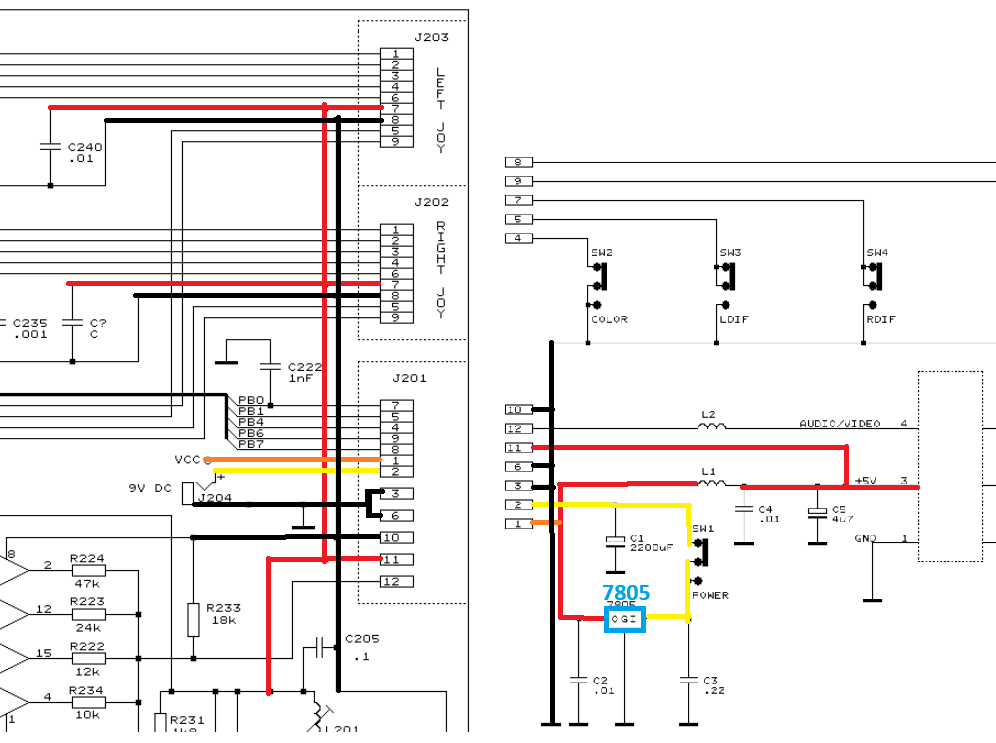
From the BOM in the field service manual, this would appear to be a 78M05 which I believe has a maximum current output of 500mA with a suitable heatsink.
But that has to power the entire console of course. In a not particularly scientific measurement, I believe my 2600 jnr was drawing around 360mA and my “woody” perhaps around 320mA. I don’t know how this changes with different games or controllers.
According to this post, an Arduino Uno with no IO pin current draw, will pull around 50mA when powered from the 5V line directly. Curiously, a bare-bones ATMega328P can apparently drop to almost 15mA when not driving regulators, a USB chip and a power LED…
From powering up a number of Arduino projects I had lying around, most hardly registered on a simple USB current meter using 10mA units. Some with LEDs got to show 0.02A. Some with screens got up to 0.2A.
So just thinking about it in a somewhat hand-wavy kind of way, I suspect that powering an Uno would probably be ok…
If not, then the 5V line to the d-type connectors will have to be cut and the Arduino independently powered. But then the signals for the keypad will be set at the Arduino’s idea of what 5V looks like, not the Atari. They ought to be essentially the same, but it can’t be guaranteed.
Ideally to go this route, the Arduino would isolated from the Atari and be switching the Atari’s 5V line on and off for the input signals as required, but that would require a new design of the PCB.
So time for an IMPORTANT WARNING: This could well damage the Atari 2600 console as I’m essentially making it up as I go at this point.
I have a cheap Atari 2600 junior that I picked up a while back that I’m happy to experiment with. I’m not using my own, original “woody”. In the end I used the following:
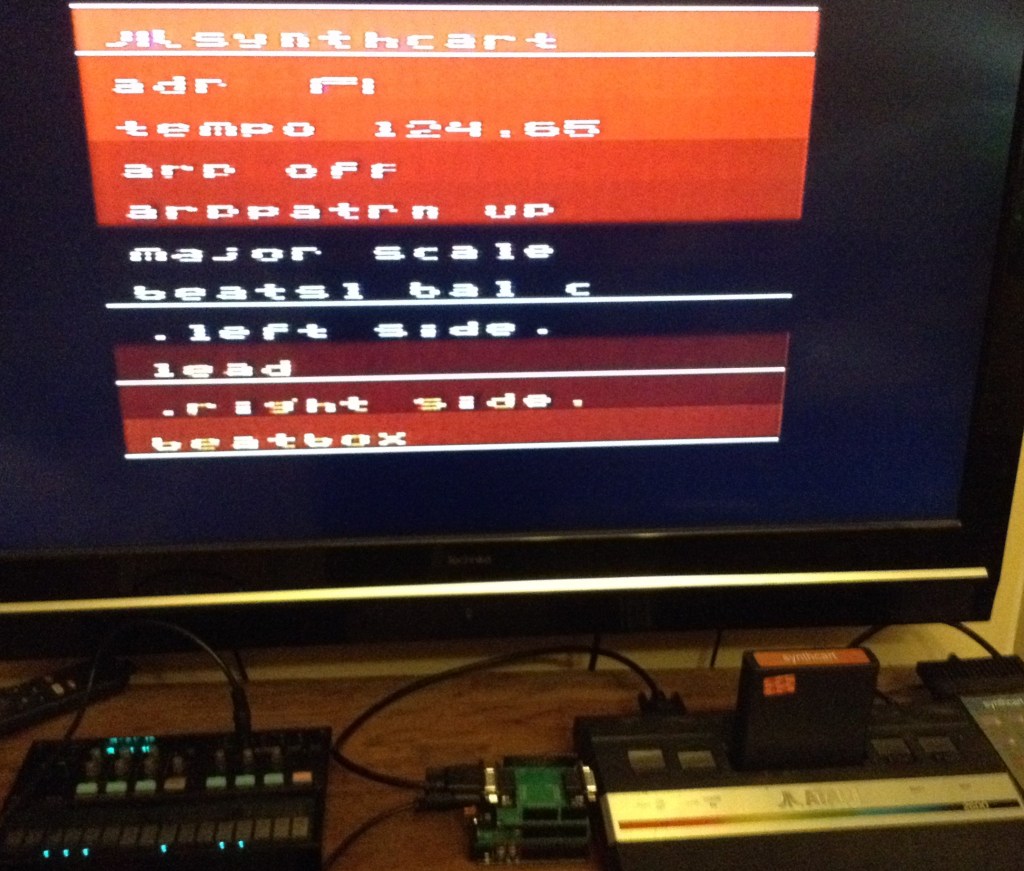
Volca <– 3.5 mm jack to jack –> Arduino TRS MIDI + Atari Shield <– 9-pin to 9-pin –> 2600
Here is the full setup using a Video Touch Pad as the second controller. Note the Arduino is fully powered from the Atari at this point, but the Volca is running on batteries.
The Code
The basic principle for the Arduino is to monitor the Atari’s “row” signals via INPUT pins and when detected drive any OUTPUTs LOW to indicate keys being pressed. The basic algorithm is as follows:
rows[] = IO INPUT pins connected to D-type pins 1, 2, 3, 4
cols[] = IO OUTPUT pins connected to D-type pins 5, 6, 9

FOREACH row[]:
  IF row is scanning LOW THEN
    Set cols[] HIGH or LOW in turn according to required keypress

REPEAT for second controller
The keypad row/column map was shown in Arduino Atari MIDI Keypad and reproduced here:
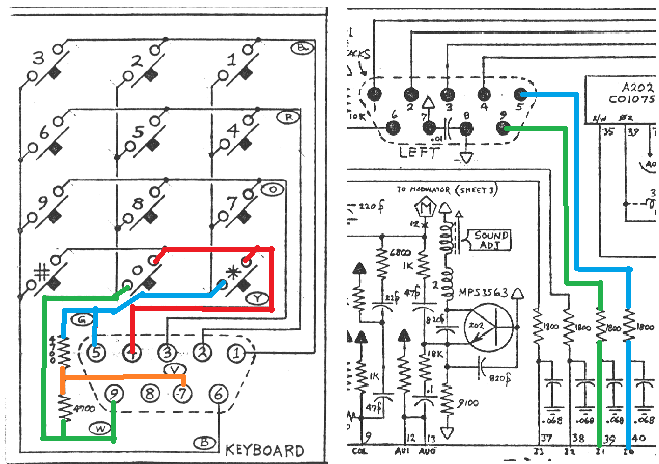
Active (pressed) keys will show as LOW in a column when that row is scanned, so to emulate 6 being pressed, when row on pin 2 is detected as being LOW, column on pin 6 should be driven LOW and columns on pins 5 and 9 should be driven HIGH.
I need to map these keys over onto MIDI notes. One issue is that the Atari doesn’t have a natural scale as generating the frequencies for notes is pretty limited.
Still, I’ve mapped the 12 keys, with their non-natural scale, over onto MIDI notes 60-71 – i.e. all semitones up from middle C.
I’m using PORT IO in an interrupt driven scanning routine to ensure the Arduino is as responsive as it can be to ROW scanning. I also pre-compute the actual column bit values when a MIDI note is received, meaning the scanning routine only has to write out the preset values.
The main functions that achieve this are shown below, with the PORT IO values set up for the second Atari controller connector on my Atari 2600 Controller Shield PCB.
uint8_t row[ROWS];
uint8_t colbits[COLS] = {
  0x02,  // C0 = A1  PORTC
  0x01,  // C1 = A0  PORTC
  0x10   // C2 = D12 PORTB
};

void keyOn (int r, int c) {
  if (r < ROWS && c < COLS) {
    // Clear the bit as need active LOW
    row[r] &= (~colbits[c]);
  }
}

void keyOff (int r, int c) {
  if (r < ROWS && c < COLS) {
    // Set the bit as need active LOW
    row[r] |= colbits[c];
  }
}

void scanKeypad (void) {
  // ROWS: D11-D8 = ROW1-ROW4
  if ((PINB & 0x08) == 0) {  // D11
    PORTB = (PORTB & (~0x10)) | (row[0] & 0x10); // COL D12
    PORTC = (PORTC & (~0x03)) | (row[0] & 0x03); // COL A0, A1
  }
  if ((PINB & 0x04) == 0) {  // D10
    PORTB = (PORTB & (~0x10)) | (row[1] & 0x10);
    PORTC = (PORTC & (~0x03)) | (row[1] & 0x03);
  }
  if ((PINB & 0x02) == 0) {  // D9
    PORTB = (PORTB & (~0x10)) | (row[2] & 0x10);
    PORTC = (PORTC & (~0x03)) | (row[2] & 0x03);
  }
  if ((PINB & 0x01) == 0) {  // D8
    PORTB = (PORTB & (~0x10)) | (row[3] & 0x10);
    PORTC = (PORTC & (~0x03)) | (row[3] & 0x03);
  }
}
As the Synth Cart notes are mostly controlled from the left controller, I’m only coding up for the Arduino to drive one controller. I’m using a genuine Video Touch Pad for the second controller.
Update: The code now includes a controller pass-through mode. If a keypad is plugged into the second socket on the Arduino, then either MIDI or the keypad can be used to drive the Synth Cart.
To achieve this, there are now two sets of row[] arrays containing the column values and when it comes to writing them out, they are combined as follows:
if ((PINB & 0x08) == 0) {  // D11
  PORTB = (PORTB & (~0x10)) | (row[0][0] & row[1][0] & 0x10);
  PORTC = (PORTC & (~0x03)) | (row[0][0] & row[1][0] & 0x03);
}
As the signals are active LOW, the two values need to be logically ANDed together to get the correct result. I could have simply called the same noteOn/noteOff routines for the keypad, but then I’d have the situation where if both keys for a note are active, the first one released will stop the sound. By combining them in this way, the note will keep sounding until both keys are released.
Closing Thoughts
I really ought to map the pitches of the Atari notes onto their respective MIDI notes, but then I’m not sure what to do for the gaps.
In principle I could wire up both controllers and then use MIDI pads on a MIDI controller just as MIDI-driving control keys rather than actual keyboard notes, but this shows the principle.
I’m still not sure about the power issues, but it seems to work. I guess it will keep working until one day it might not and I’ll be looking for a new Atari 2600 junior.
The slight stuttering in the video is when I end up touching a couple of the volca’s keys at the same time. I suspect I could do something a bit more robust in code to prevent repeat triggering, but this is all fine for now as a proof of concept.
Kevin

 Simple DIY Electronic Music Projects