This takes my Forbidden Planet “Krell” Display and adds some potentiometers to turn it into a MIDI CC message controller.
Warning! I strongly recommend using old or second hand equipment for your experiments. I am not responsible for any damage to expensive instruments!
If you are new to Arduino, see the Getting Started pages.
Parts list
- Completed Forbidden Planet “Krell” Display.
- Arduino Nano or Uno.
- 10K Potentiometers.
- MIDI Interface, e.g. DIY MIDI Interfaces, Ready-Made MIDI Modules, and so on.
- Breadboard and jumper wires.
The Circuit
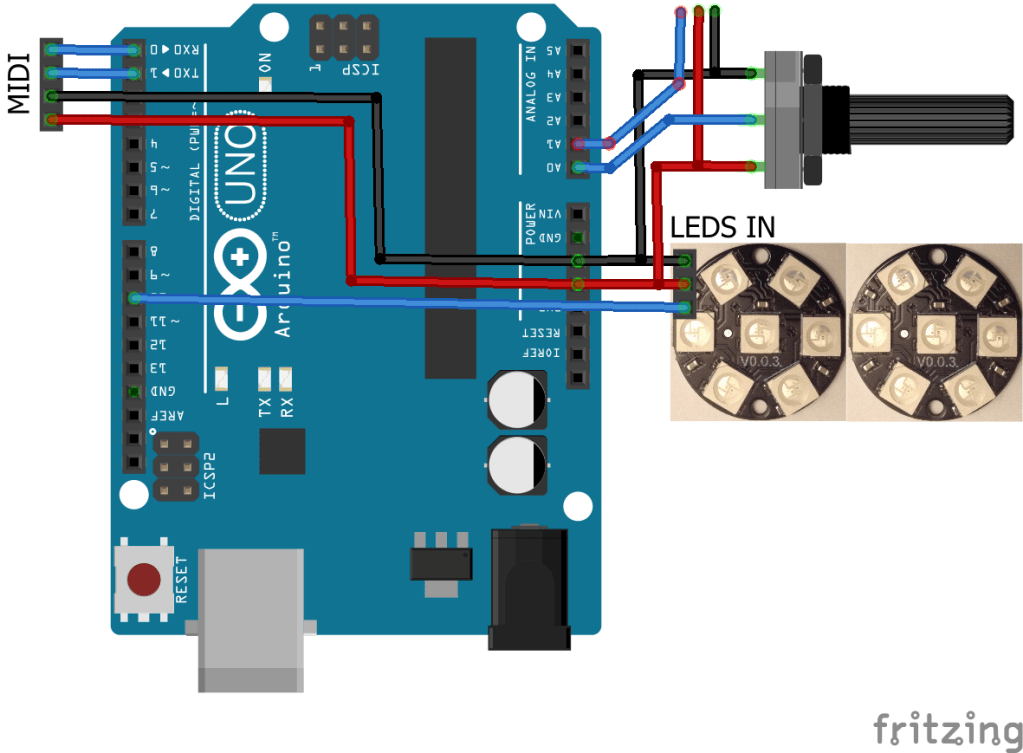
Potentiometers are wired to 5V/GND and require one of the analog inputs of the Arduino each.
A MIDI OUT interface is required on TX. If MIDI THRU is required then MIDI IN will also be needed on RX.
As detailed in my previous post I can just about get away with powering my LED rings from the Arduino provided I keep the power levels down and don’t drive them too much. The LED rings required 5V, GND and a data signal.
I have many options for adding potentiometers to microcontrollers to make the wiring a lot easier:
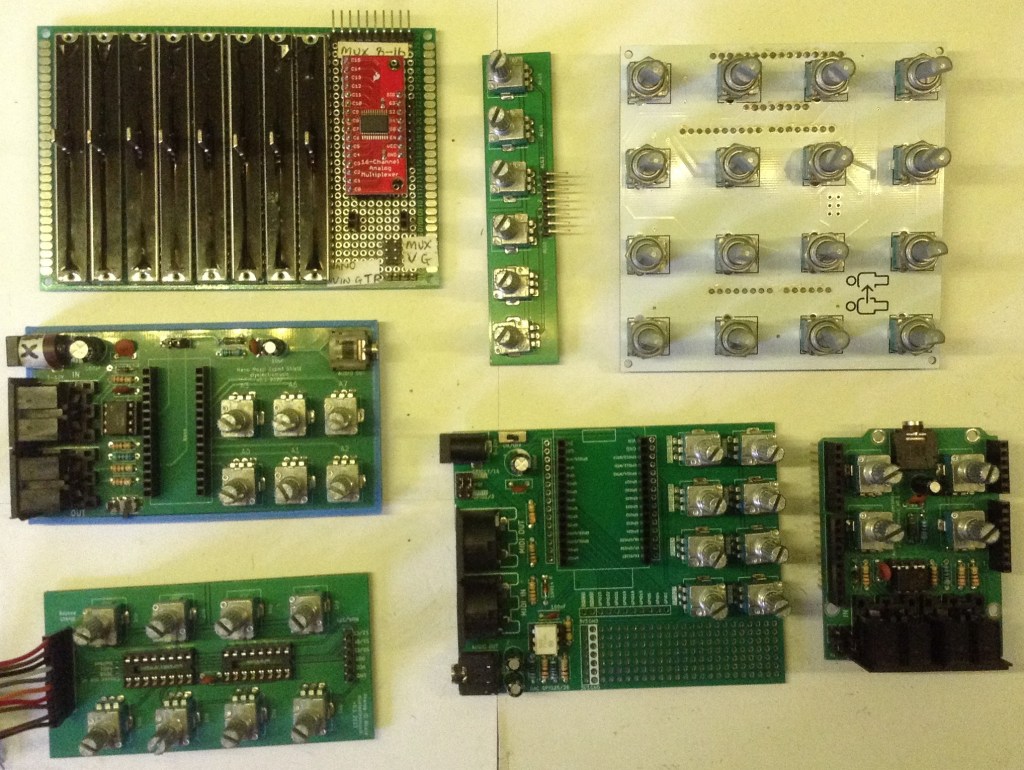
In the end I opted to use my Arduino Mozzi Experimenter Shield which has MIDI, four potentiometers and a PWM output (which I won’t need in this case). This is designed for use with an Arduino Uno.
To keep the wiring tidy, I used A4 rather than D10 as the LED digital signal. The pots are connected to A0 to A3.

The Code
All the elements of the code have been used before. Again, I’m using the LED “mapping” technique from my original Forbidden Planet “Krell” Display test code, so that side of things is largely unchanged.
In terms of potentiometer handling I’m using the reading and smoothing code from the Arduino MIDI Master Volume Control.
The MIDI CC handling is very similar to the Arduino MIDI Multi Pot Controller. I’ve included MIDI.read() functionality to allow software THRU handling.
The only quirk related to bringing it all together was how to map the MIDI CC values onto the LEDS in each ring of the display. I’ve gone for one pot/MIDI CC value per ring of LEDS so that gives me 5 visual segments (plus completely off) per CC.
I calculate how much of the MIDI CC range (0 to 127) relates to each LED, then reduce the MIDI value by this much for each LED in turn. If the value is still more than zero, then that LED should be on. If the value is zero or less, then the LED should be off.
For 5 LEDs in each ring, the ends up splitting the MIDI CC range into the following:
- 0 – off.
- up to 25 – first LED.
- up to 50, 75, 100 – next LEDs in turn.
- over 100 – last LED.
The code for this is wrapped up into a single function that takes a ring to work on (there is one per potentiometer) and the CC value to display.
void ledSetController(int ring, uint8_t value) {
  int ledspan = 127 / LED_BLOCK;
  int ledval = value;
  for (int i=0; i<LED_BLOCK; i++) {
    if (ledval > 0) {
      ledOn(ring, i);
    } else {
      ledOff(ring, i);
    }
    ledval -= ledspan;
  }
}
Closing Thoughts
Alternative schemes could map a single potentiometer to multiple Krell displays if better resolution is required. Another variation could use slider potentiometers or even rotary encoders.
Really to make this useful, it would be good to have a box that allows the pots to be fitted close to the display it controls. Then, ideally the only connections required would be power and MIDI.
It might be neat to have a USB MIDI version too, so that power and MIDI is all from the USB connection.
It would also be really neat to have some of those magnetic electrical connectors so that adding more displays was just a matter of “snapping” another one on! That would probably take a fair bit of mechanical design though, something I don’t really do at the moment.
I am seriously considering designing a 3D print EuroRack sized panel for two Krell displays though. If I’m using the same dimensions as these (which match those LED rings really nicely) then I’d need a 10HP module. That would totally be doable, but at this point it would probably be best to just have a CV input to control the dials rather than MIDI. I’m still thinking about this one…
Kevin

 Simple DIY Electronic Music Projects