I’ve been looking into how it might be possible to get 16 tone generators running on MiniDexed, essentially giving the equivalent of a whole DX7 on each of the 16 MIDI channels.
This post looks at some of the options I’ve looked at:
- Simply using MIDI THRU to connect two independent MiniDexeds with 8 TG each.
- Combining two MiniDexeds with 8 TG each in a single “dual MiniDexed” UI.
- Enabling 16 tone generators on a Pi 4 MiniDexed.
- Linking 8 Pi V1 MiniDexeds together.
Update: 16 TG support is now a part of the main MiniDexed firmware for Pi 4 or 5. For details, see https://github.com/probonopd/MiniDexed/wiki/Files#system-options.
Please Note: The other options described in this blog post are largely experimental, and the changes have not tracked the latest MiniDexed releases. I’ll come back to this and do an update at some point!
Warning! I strongly recommend using old or second hand equipment for your experiments. I am not responsible for any damage to expensive instruments!
If you are new to microcontrollers and single board computers, see the Getting Started pages.
Introduction
I should probably explain why I guess. Well, to be honest, mostly “just because” but 16 is a good number for such things as there are 16 MIDI channels and having 16 MIDI instruments at your fingertips gives a greater possibility of being able to play MIDI files directly.
Also, as MiniDexed supports 8 tone generators on any of the multi-core Raspberry Pis, it shouldn’t be too difficult to just use two of them together. And that is in fact a key component of some of the methods I’ve looked at.
This post will consider the following options:
- Just running two MiniDexed instances.
- Mods for a MiniDexed instance to support an expansion of 8 TGs running on a second RPi.
- Mods for a RPi 4 to run 16 tone generators directly.
Two MiniDexeds
This is the simplest of all approaches, and essentially requires that there are two instances of MiniDexed on two Raspberry Pis, connected via a MIDI THRU link, largely as follows.

The key idea is that TGs 1-8 on the first MiniDexed are configured for MIDI channels 1-8 and TGs 1-8 on the second MiniDexed are configured for MIDI channels 9-16. The first MiniDexed is configured for MIDI THRU, which could happen in two ways:
- As shown in the photo, this is using my MiniDexed Raspberry Pi IO Board in the HD4470 version which includes a hardware MIDI THRU port directly.
- Alternatively, using a MIDI OUT port, and the following line in the minidexed.ini file of the first MiniDexed.
MIDIThru=ttyS1,ttyS1
This configures software MIDI THRU to echo all MIDI information received via the MIDI IN port back out over the MIDI OUT port, which is then connected to MIDI IN of the second MiniDexed.
This is by far the simplest option, but the downside is that there is no commonality between the two units – they are just two different synthesizers at this point, listening on different MIDI channels. But it is simple, and it works.
Dual MiniDexed
So I wanted to do better, but given how simple and useful the above configuration is, this is really getting into “but why bother” territory! But that has never stopped me before.
What I really wanted was to be able to use the same screen/encoder/buttons to control all 16 TGs of a pair of MiniDexed instances. The idea is to have one MiniDexed with a full user interface (the “main”) and a second one running “headless” (the “expander”). All user interface commands on the main one that correspond to TGs 9-16 will be passed onto the expander over MIDI.
Note: This is not an officially supported option, this is just some test messing around.
MIDI MiniDexed SysEx Protocol
I’ve used system exclusive messages, which are MIDI channel agnostic, to pass on the parameters. Messages are constructed as follows:
// MiniDexed SysEx Parameter Message Format
//   F0 7D tg pp d1 d2 F7
//
//     tg = 0 to 15 for TG number (1-16), or 16 for Global Parameters
//     pp = Parameter number
//     d1 = 14-bit data value (MSB)
//     d2 = 14-bit data value (LSB)
F0/F7 are the codes for the start/end of a SysEx message. 7D is a special manufacturers ID that is reserved for experimental use and so should not be used “in the wild”. The actual messages are thus made up of four bytes within this as described above.
Mapping this onto MiniDexed, “global parameters” are things like the effects, which apply across all tone generators. The parameters correspond to the editable items in the UI menus. The data uses the MIDI convention of using two 7-bit values to construct a 14-bit value, so the data can range from 0 to 16383.
Changes to MiniDexed Source
The following source files need updating to support this idea:
- Config.h/Config.cpp: changes definitions of the number of tone generators and if expanders are configured. This introduces two new config settings:
TGExpanders=8       # Set to 8 for the main and 0 for the expander itself
TGExpanderStart=1   # Set to 1 for the main and 9 for the expander itself
- mididevice.cpp: this needs knowledge of the new SysEx message format to ensure they are routed correctly.
- minidexed.h/minidexed.cpp: now includes two new functions: remoteTGSend and remoteTGRecv to handle the message passing. These will be called from a range of different places in the parameter handling for the system which now manages the parameters for 16 tone generators rather than 8.
- sysfileloader.h/sysfileloader.cpp: this requires a new function GetVoiceName that will return the selected voice’s name, which can be used by minidexed.cpp to manage the remote expander.
- uimenu.h/uimenu.cpp: this now has entries for TGs 9 to 16 but will need to ensure these are only visible when the expanders are configured.
The changes can currently be tracked here: https://github.com/diyelectromusic/MiniDexed/tree/TGExpander
Update: There is a newer version of this change now integrated with the 16 TG Pi 4 version too. That can be tracked here: https://github.com/diyelectromusic/MiniDexed/tree/16TGExpander
The configuration settings in minidexed.ini have been updated as follows:
#
# TG Expander: for normal (single) MiniDexed use:
#      Main: TGLocal=8, TGRemote=0, TGLocalStart=1
#
# TG Expander: for dual MiniDexed linkup:
#      Main: TGLocal=8, TGRemote=8, TGLocalStart=1
#  Expander: TGLocal=8, TGRempte=0, TGLocalStart=9
#
# Connect serial MIDI OUT of Main to serial MIDI IN
# of Expander and enable MIDI THRU via ttyS1 on Main.
#
# Set TGRemote to 0 to disable expander use.
TGLocal=8
TGRemote=0
TGLocalStart=1
So to duplicate the dual MiniDexed configuration requires the following:
# Main MiniDexed configuration
TGLocal=8
TGRemote=8
TGLocalStart=1

# Remote MiniDexed configuration
TGLocal=8
TGRemote=0
TGLocalStart=9
Additional MiniDexed Configuration
In addition to the new config options described above, MIDI THRU must be enabled on the main RPi and MIDI OUT connected to MIDI IN of the expander Pi, as shown in the first option.
Limitations of the System
- Both MiniDexed instances will have to have exactly the same banks, voices and performances installed.
- There is no acknowledgement of sent commands, but that means that only a unidirectional link is required between the main and expander MiniDexeds.
- Both systems will respond to MIDI commands.
- There is no UI on the expander MiniDexed to get significantly out of sync, but using MIDI commands might still allow it to happen.
The video at the top of this post shows the system in action.
Dual MiniDexed PCB
I’ve designed a PCB to make experimenting with this a little simpler. Details can be found here: RPi Dual MiniDexed PCB Design.
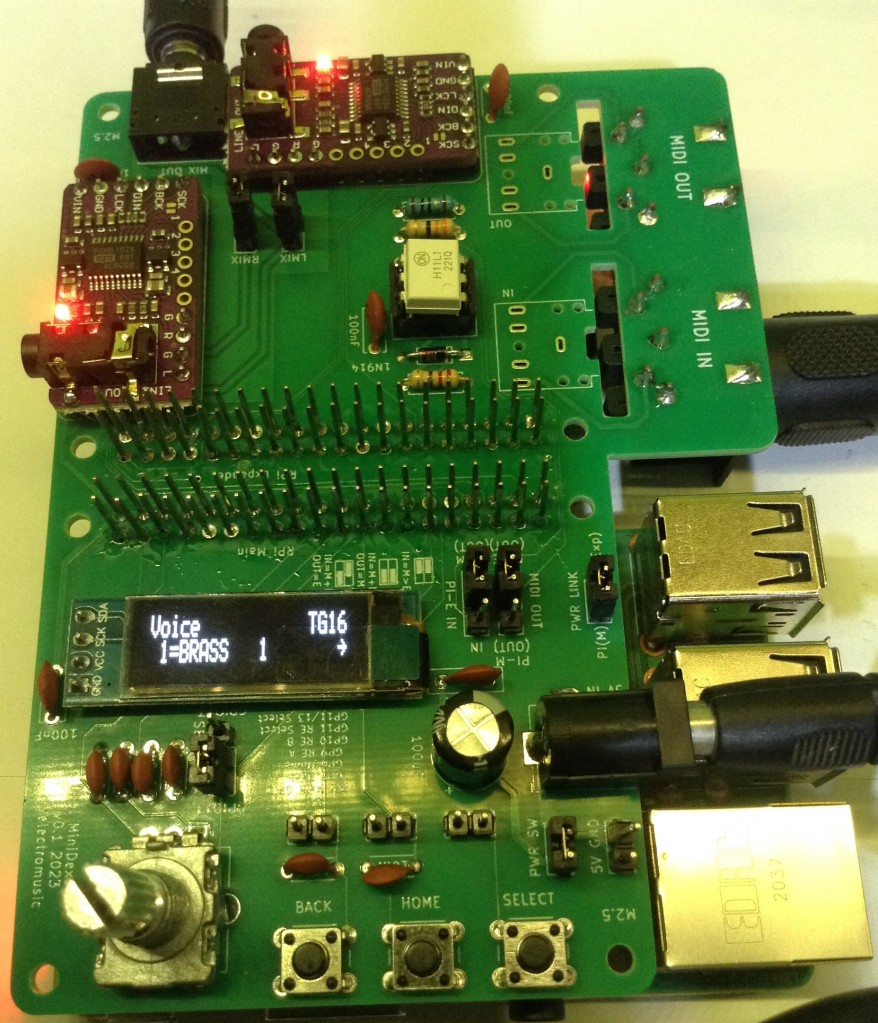
16 TG RPi 4 MiniDexed
The final option discusses how to configure MiniDexed running on a Raspberry Pi 4 for 16 tone generators. The thinking being that running 8 TGs on a Pi 2 or 3 seems to work ok, so moving up to 16 on a Pi 4 really ought to be possible!
The background for this is that the four cores of the Pi 2, 3 or 4 are used as follows:
- Core 0: Initalization; IO (MIDI, buttons, encoders, etc) and user interface handling.
- Core 1: Two tone generators; mixing; effects; audio output
- Core 2: Three tone generators
- Core 3: Three tone generators
So expanding core 1 to 4, and cores 2 and 3 to 6 TGs each ought to be possible. This requires the following changes:
- config.h: Change the number of TGs per core for a RPi 4.
- minidexed.h/minidexed.cpp: there is one assert that has to be changed from 8 to 16 and all references to m_nActiveTGsLog2 need to be removed. This is specific to 8 TGs but doesn’t appear to be used anywhere.
- uimenu.cpp: the main menu needs expanding to support 16 TGs.
The changes can currently be tracked here: https://github.com/diyelectromusic/MiniDexed/tree/Pi4-16TG
Update: This has now merged with the “expander” code described above and can be found here: https://github.com/diyelectromusic/MiniDexed/tree/16TGExpander
The default option for the Pi 4 is to support just 8 expanders, the same as core MiniDexed, so to enable all 16 requires the following configuration in minidexed.ini:
TGLocal=16
TGRemote=0
TGLocalStart=1
Update: An official configuration for 16 TGs on a Pi 4 or higher is now in the main MiniDexed firmware (details here). The other changes described above are not tracking the official releases at present and remain experimental.
The video below shows all 16 tone generators being played at once from a MIDI keyboard.
8 Raspberry Pi V1 TGs
Ok, so this didn’t quite make it to 16 tone generators (although I see no real reason why it isn’t possible – just not practical!), but with the experimental changes I’ve added to MiniDexed it is possible to use the “multiple MiniDexed” trick to get a single Raspberry Pi V1 configured for 7 additional remote tone generators each on a Pi 1 itself and control them as if they were one 8 TG system.
To achieve this several additional elements are required:
- Some means of passing MIDI from the main MiniDexed (the one with the UI) to the remote tone generators.
- One option is to “daisy-chain” MIDI OUT/THRU to MIDI IN, but that is a lot of MIDI interfaces and cabling required.
- In principle the main UART TX could be connected directly to all remote UART RX pins in a “broadcast” fashion via Dupont jumper wires.
- I used something that was a mix of both: a 3.3V serial MIDI THRU circuit, as described here: 3.3V Serial MIDI THRU.
- Each Pi V1 requires a means to produce audio. I just used the PWM audio output via the on-board 3.5mm jack.
- The audio from all Pi V1s has to be mixed somehow externally.
- I used two linked 4-way mixer pcbs, so ended up with 7 audio channels mixed in as one input was given over to the output from the other mixer.
The MiniDexed configuration required to allow me to do this requires the following:
- Main MiniDexed configured for a UI and 7 remote TGs. It is configured as TG 1 on MIDI channel 1.
- Each of the remote MiniDexed is configured for no remote TGs, a singe local TG set to one of TG2 to TG8. The MIDI channel is set to match the TG number – so again one of 2 to 8.
This is supported by the same branch of code as used above, which can be found here: https://github.com/diyelectromusic/MiniDexed/tree/16TGExpander
Once again this is experimental only and not tracking the main MiniDexed code.
The video below shows all TGs starting out on the Brass 1 voice and getting changed as Pachabel’s Canon in D is played.
Closing Thoughts
This is still a work in progress, but having everything merged into a single branch for changes is a lot easier. I haven’t decided if this should be submitted back to the main code yet. It will largely depend on interest I guess. I suspect there might be more interest in the 16 TG version, especially with a new more powerful Raspberry Pi around now. The remote expander side, maybe is a bit more niche.
I probably shouldn’t mention the Raspberry Pi V1 expander modes! That is a lot of boards and additional wiring to get the equivalent of what a single Pi V3 can do 🙂 Although I am now wondering about some kind of backplane to plug the Pi V1s into…
16 TG support on a Pi 4 or 5 is now part of the core MiniDexed firmware. Development and tinkering with the other options is still ongoing…
Kevin

 Simple DIY Electronic Music Projects