I’m always on the look out for new ways of building control modules for my Arduino synthesizers, so when I discovered the MCP3008 SPI 8-channel analog to digital converter, I thought I’d give it a go with my Arduino Multi-pot Mozzi FM Synthesis.
Warning! I strongly recommend using old or second hand equipment for your experiments. I am not responsible for any damage to expensive instruments!
These are the key Arduino tutorials for the main concepts used in this project:
If you are new to Arduino, see the Getting Started pages.
Parts list
- Arduino Uno
- MCP3008 SPI 10-bit ADC
- 4x 10k potentiometers
- 8 ohm speaker or old headphone speaker and 1x 220Ω resistor
- Optional: Arduino PWM Output Filter Circuit
- Ready-Made MIDI Modules
- Breadboard and jumper wires
The Circuit
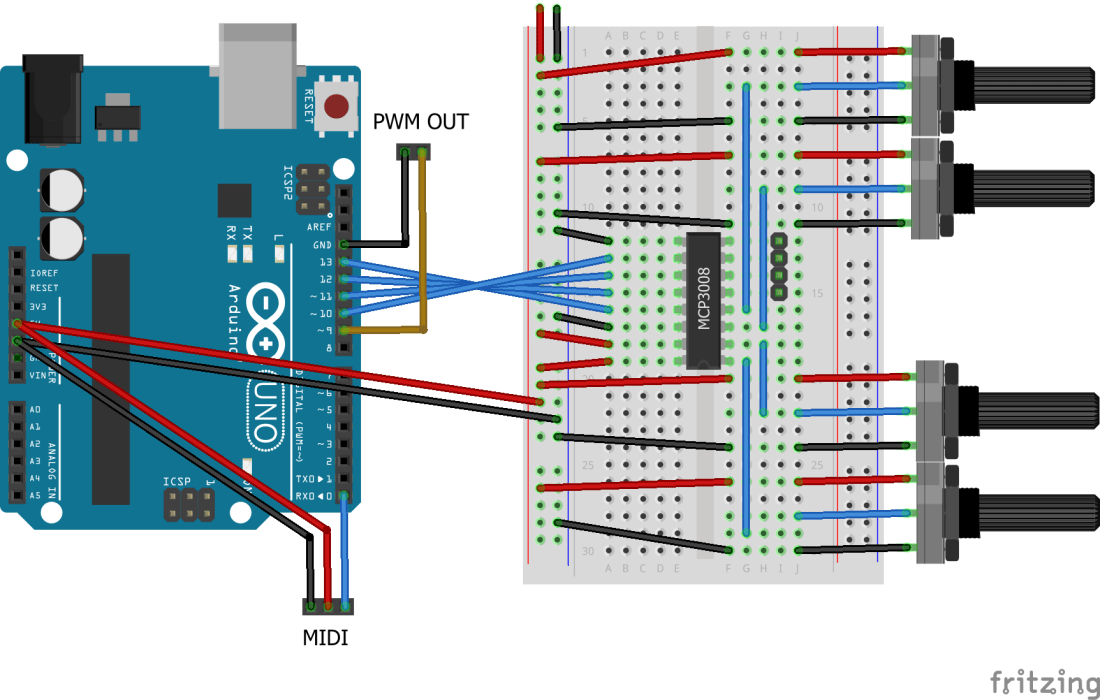
The MCP3008 is an SPI driven 8-channel, 10-bit analog to digital converter. It allows you to read up to 8 potentiometers with 10-bit resolution whilst only requiring 6 connections to a microcontroller (including power and ground). It needs to be connected to the Arduino as follows:
- Arduino 13 (CLK) – MCP3008 13 (CLK)
- Arduino 12 (MISO) – MCP3008 12 (DOUT)
- Arduino 11 (MOSI) – MCP3008 11 (DIN)
- Arduino 10 (SS) – MCP3008 10 (CS/SHDN)
- Arduino 5V – MCP3008 16, 15 (VDD, VREF)
- Arduino GND – MCP3008 14, 9 (AGND, DGND)
Pins 1 to 8 on the MCP3008 correspond to channels 0 to 7 of the ADC.
The potentiometers are configured to be used with Mozzi as follows:
- Channel 0 – Wave select
- Channel 1 – FM intensity
- Channel 2 – Modulation rate
- Channel 3 – FM modulation ratio
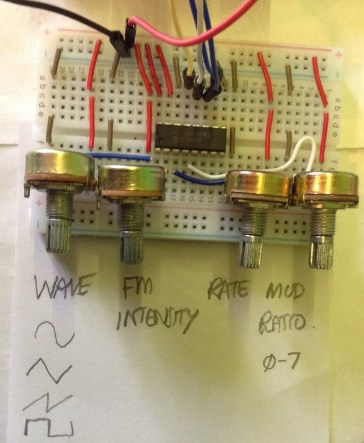
There is the ability to extend the breadboard to four additional ADC channels, but I’m only using four at present.
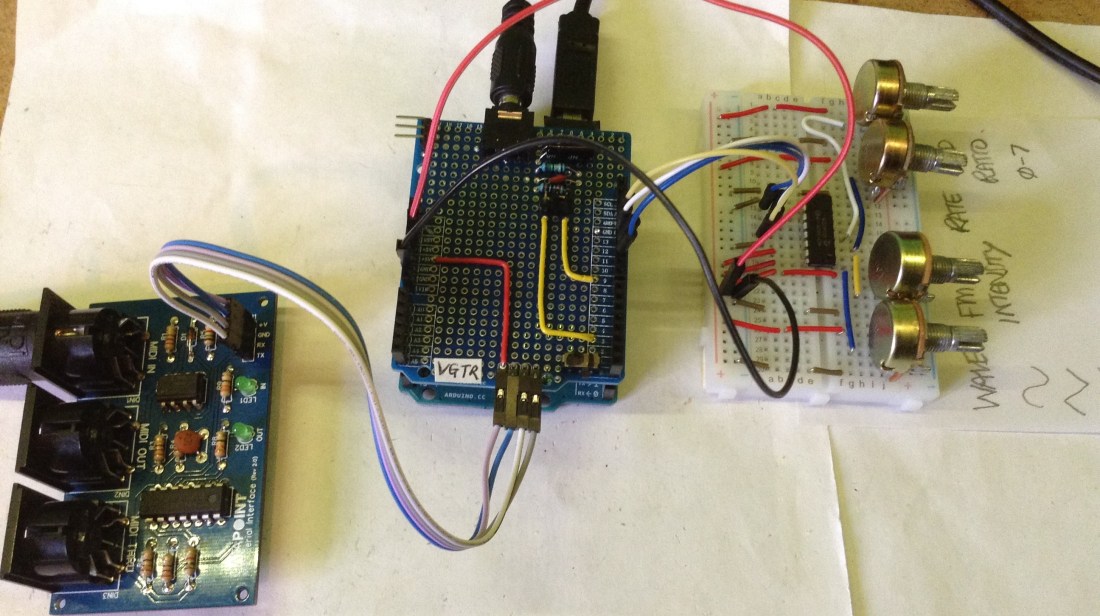
In the circuit above you can connect the Mozzi PWM output (pin 9) to some kind of amplification or, as I have in the photo below, using a filter circuit. I’m using one of my Ready-Made MIDI Modules connected to the Arduino RX pin for the MIDI IN.
The Code
I’ve started with the Arduino Multi-pot Mozzi FM Synthesis code but just swapping out the existing mozziAnalogRead functions, which use the Arduino’s built-in analog inputs, to my own mcp3008AnalogRead functions which use a MCP3008 library.
I initially tried to use the MCP3008 library from Adafruit but had problems with I2C clashes with Mozzi (even though I’m not using I2C), but there are a few different MCP3008 libraries and I settled on Christopher Baker’s MCP3XXX library which can be found here: https://github.com/bakercp/MCP3XXX. It can be installed using the Arduino library manager and has a relatively simple interface.
In order to allow the option to keep using the built-in Arduino analog inputs, I’ve hidden the calls behind a conditional compilation step.
#define MCP3008_ADC 1

#ifdef MCP3008_ADC
#include <MCP3XXX.h>
MCP3008 adc;
#define READALG mcp3008AnalogRead
#else
#define READALG mozziAnalogRead
#endif
The MCP3008 replacement analogRead function is quite simple:
int mcp3008AnalogRead (int chan) {
  return adc.analogRead(chan);
}
Each of the previous calls to mozziAnalogRead have been replaced with the READALG macro above and the MCP3008 simply needs initialising in the setup() code.
#ifdef MCP3008_ADC
adc.begin();
#endif
Closing Thoughts
I now have the option of expanding this to 8 potentiometers relatively easily. It is always good to have options. For interfacing to pots now, I could do any of the following:
- Direct connections: 6 pots with an Uno; 8 with a Nano; 16 with a Pro Mega.
- 8 or 16 channel multiplexers.
- SPI 8 channel ADC.
One of the reasons I was looking at the MCP3008 in the first place is that I want to do some more complex synthesis using a Raspberry Pi, but the Pi doesn’t have any built-in analog to digital converters (unlike the Pico which has four). The MCP3008 seems a common way to go.
Kevin

 Simple DIY Electronic Music Projects