One thing I wanted to do as a follow-up to my Pico MIDI (H)Arp was to use some data from the Internet as the source for some generative music. This post is my first try at taking my Twitter follower data and turning it into sound.
- A follow-up project uses a Raspberry Pi Pico to turn Twitter followers into MIDI notes.
Warning! I strongly recommend using old or second hand equipment for your experiments. I am not responsible for any damage to expensive instruments!
These are the key tutorials for the main concepts used in this project:
If you are new to Arduino, see the Getting Started pages.
Parts list
- Arduino Uno
- R2R DAC (as described here)
- Python and means to obtain Twitter data
- Optional LED and resistor
The Circuit
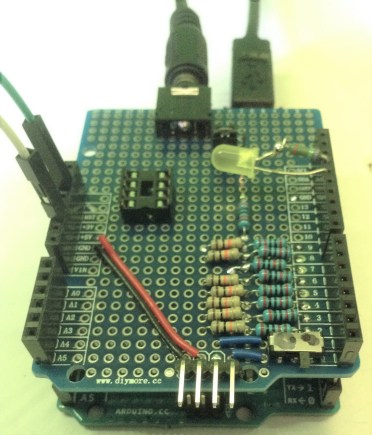
I am using an Arduino Uno with my R2R DAC shield for the audio generation but you could base it on the PWM output too if you prefer. There are two minor additions:
- Optional: LED and resistor between D13 and GND to mirror the built-in LED above the shield.
- Optional: jumper wire between RST and GND to allow me to “start” the playback when I’m ready.
Other options I considered, and might return to at a later date, include:
- Using a Raspberry Pi Pico and the Pimoroni Pico Wireless to obtain the Twitter data live and play it back.
- Using a “full” Raspberry Pi to obtain Twitter data sending it over a serial link to an Arduino.
- Using a “full” Raspberry Pi with a directly connected DAC.
But to get started on the idea, I’ve used Python on my PC to grab the Twitter data and an Arduino Uno with my R2R DAC to turn it into sound.
Twitter Data
Eventually I would like to be able to connect “live” from a microcontroller and play the Twitter data as it changes, but for now, I’ve opted to download it using Python on my PC, output it as a CSV file and then use Excel to export the two columns of numbers in a way that I can past into a source file.
Here is a graph of the follower and friend counts for all my Twitter followers.
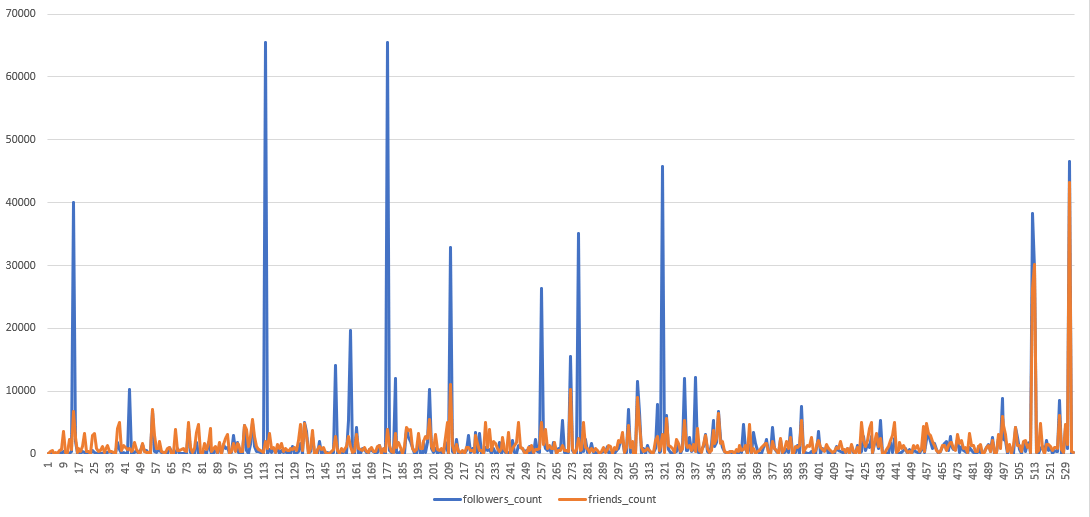
I want to generate music based on my Twitter followers. I’ve opted for the following – for each of my own Twitter followers:
- Take their follower count and turn it into a duration for a note.
- Take their friends (following) count and turn it into a frequency for a note.
You need to request a Twitter developer account and obtain a set of Twitter App/API keys. I’m not going to go through how to do that, as you can read about in the linked tutorial here. I’ve told twitter I only want read only access (i.e. I won’t be tweeting myself) to Twitter data for the purposes of turning it into music!
You also need to install Python, Tweepy, and Panda to use this script. This is what I ended up using:
# Code based on tutorial from
# https://towardsdatascience.com/how-to-download-twitter-friends-or-followers-for-free-b9d5ac23812
import configparser
from tweepy import API, Cursor, OAuthHandler, TweepError
import pandas as pd

# Read in configs
configs = configparser.ConfigParser()
configs.read('./config.ini')
keys = configs['TWITTER']
consumer_key = keys['CONSUMER_KEY']
consumer_secret = keys['CONSUMER_SECRET']
access_token = keys['ACCESS_TOKEN']
access_secret = keys['ACCESS_SECRET']

# Authenticate Tweepy connection to Twitter API
auth = OAuthHandler(consumer_key, consumer_secret)
auth.set_access_token(access_token, access_secret)
api = API(auth, wait_on_rate_limit=True, wait_on_rate_limit_notify=True)

screen_name = 'twitterhandlehere'

ids = []
for fid in Cursor(api.followers_ids, screen_name=screen_name, count=5000).items():
    ids.append(fid)

info = []
for i in range(0, len(ids), 100):
    print(ids[i])
    try:
        chunk = ids[i:i+100]
        info.extend(api.lookup_users(user_ids=chunk))
    except:
        import traceback
        traceback.print_exc()
        print('Something went wrong, skipping')

data = [x._json for x in info]
df = pd.DataFrame(data)
df = df[['id', 'name', 'screen_name', 'followers_count', 'friends_count']]
print (df)
df.to_csv('followers.csv', index=False)
This requires your Twitter API keys to be stored in a file called config.ini as described in the article. I ran this, replacing “twitterhandlehere” with “diyelectromusic” and obtained a file with 534 entries in, one for each of my Twitter followers as of the 2nd August 2021.
Warning: There is no limit checking here – if you try this on an account with millions of followers, it will attempt to prod Twitter millions of times for all their information! You have been warned! I also recommend that if you try this, you only try it on your own account unless you really know what you’re doing.
This is then converted into a C header file called “twitterdata.h” which needs copying into the Arduino environment. This just contains the structure:
const PROGMEM uint16_t twitdata[] = {
1,1,
...
...
257,248,
};
The first number in each pair is the number of followers for an account and the second number is the number of “friends” (i.e. those being followed by the account). My code does grab the Twitter internal identifier and the Twitter screen name and account name, so I can see which accounts trigger certain sounds if I wanted to.
There is one quirk to be aware of. Some of the numbers are larger than 65535, the biggest number you can store in a uint16_t. That just means that when I compile, these values get truncated down to a 16-bit value.
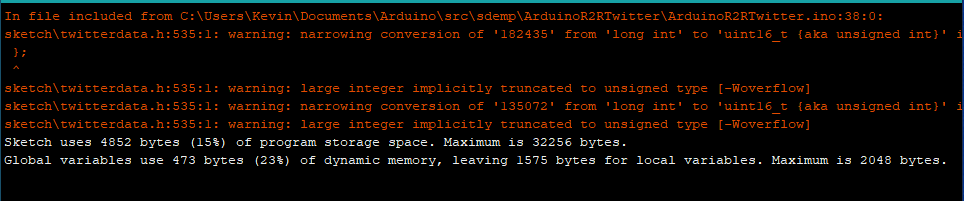
I could extend the table to 32-bit values but that would double the storage requirement, and really skew the range of values without more processing. Keeping a natural ceiling of 65535 for both values gives me a natural maximum to worry about.
The Code
The main code is based on the R2R output code from Arduino R2R Digital Audio – Part 3 but instead of taking inputs from potentiometers, it has a fixed waveform setting and derives the frequencies to use from the Twitter data.
Once I had the raw data, there are several things I could do it, but I particularly wanted to use the numbers to generate raw frequency tones, as I was after some kind of micro-tonal effect for “between notes” sounds.
The algorithm I settled on is the following.
uint16_t duration = pgm_read_word(&twitdata[cycle*2]);
uint16_t freq = pgm_read_word(&twitdata[cycle*2+1]);
frequency = 60+freq/8;        // Min 60Hz; Max 8252Hz
long waiting = 20+duration/2; // Min 20mS; Max 32768 mS or approx 33 seconds
Notice that the list of numbers is stored in PROGMEM, so I need to read them out using pgm_read_word. In each case the first word (followers) sets the duration and the second word (friends) sets the frequency.
I’ve opted for a minimum frequency of 60Hz and then “friend count/8” giving me a maximum frequency of 65535/8 + 60 = 8252Hz, which is pretty ridiculously high anyway – it is around C9 which is more than an octave higher than the highest note on a piano.
In terms of duration, I chose to translate the followers count into milli-seconds, with a minimum of 20mS and maximum of 65535/2 + 20 or 32788mS – almost 33 seconds.
In practice this means that the higher follower counts, i.e. the longer notes, tend to also be the highest notes too.
In the code, as I’m doing nothing else in the main loop, I can feed the duration value straight into the Arduino delay() function to get the timing.
I added a toggling of the LED_BUILTIN (but then had to add an external LED as the built-in LED is under the shield!) each time through the loop so it is possible to see the changes as well as hear them. I’ve also added a simple printout to the console as the script runs.
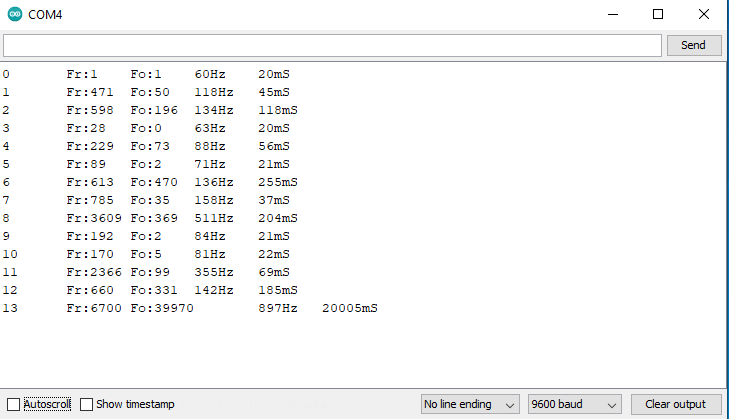
Here you can see the first “large follower count” account appearing. I have RS Components to thank for this 20s 897Hz tone! The first account, with just one follower and one friend is the “test developer account” I created to do this project.
Closing Thoughts
This is just the first simple experiment of many. It is proving the concept and whilst the data is accurate as of the time I ran my Python script, and really is from Twitter, it isn’t “live” – that is to say it isn’t dynamically refreshed every time the code runs. As I say eventually I want a fully self-contained system that is capable of grabbing the Twitter data directly and playing it, but that probably won’t be an Arduino Uno due to its lack of memory.
This is definitely something to explore further with the Raspberry Pi Pico or the Raspberry Pi itself.
At some point I’ll experiment with generating MIDI too, not just raw frequencies and it isn’t a big step to create more sophisticated synthesis options too, but for now I’ve stuck with playing a triangle wave.
In the video you can hear eight minutes worth of tones created from my Twitter followers.
Kevin

 Simple DIY Electronic Music Projects