I’ve wanted an excuse to play with some of the Adafruit Feather lines of boards for a while, so I finally dipped in a bought a board and a couple of add-ons.
You can get most of their range in the UK from Pimoroni, The Pi Hut, and others (I’m not affiliated with any of these – I’m just trying to makes things easy if you want to follow along).
This project is my first go at getting MIDI to drive the Music Maker wing (“wing” is the term used by Adafruit for the Feather equivalent of an Arduino “shield”). The Music Maker is based on the VS1053 that we’ve met before and Adafruit have also just released a MIDI Wing too.
- In the next part, I add in the LED “wing” too.
Warning! I strongly recommend using an old or second hand keyboard for your MIDI experiments. I am not responsible for any damage to expensive instruments!
These are the key Arduino tutorials for the main concepts used in this project:
- Adafruit Feather 32U4 Basic tutorial
- Adafruit Music Maker FeatherWing tutorial
- Arduino MIDI VS1053 Synth
If you are new to Arduino, see the Getting Started pages.
Parts list
- Adafruit Feather 32U4 Basic
- Adafruit Music Maker FeatherWing
- Adafruit MIDI FeatherWing
- Adafruit Charlie Wing (not used in this project, but I’ll be using it later!)
- Adafruit Quad Side-By-Side FeatherWing Kit (optional)
The Circuit


The boards need headers soldering on to them and there are a whole range of options. It is worth browsing through the Adafruit provided tutorials to decide for yourself both which Feather boards to get and how to link them up to “wings”. I decided to opt for the quad-wing proto board which allows four of the Feather form-factor boards to be used side by side as in the above photo although I won’t be using them all at once initially.
I chose to use the ATMega32U4 based Feather 32U4 Basic as my microcontroller. I wanted a board that would allow me to do native USB at some point in the future and the 32U4 allows that whereas the ATMega328P (as used in the Arduino Uno and Nano) does not. There are more powerful Feather boards too based on 32-bit microcontrollers and a whole range of others too, but for these experiments staying with the 8-bit AVR line as used in the my other projects so far is fine by me.
One benefit of using the 32U4 is that the serial port used for uploading (via USB) is different to the serial port provided via the RX/TX pins which means it should be fine to leave the MIDI shield connected whilst programming the board.
However, for some reason (yet to be explored) whilst the Music Maker wing and the MIDI wing are both plugged in I get upload problems. It is fine when either of the Wings is used on its own, it is just having both plugged in that seems to cause an issue.
I’m not sure why as I thought USB serial port used for uploading was independent of the serial port linked to the MIDI or VS1053. Anyway, the solution for me seems to be to remove the pin connected to the “MIDI” pin (TX) of the Music Maker wing as shown below (2nd pin in from the right).
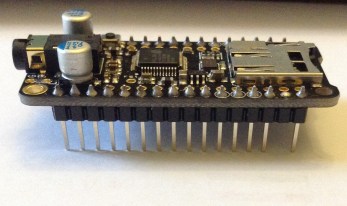
This means I can’t send MIDI directly to the Music Maker wing, so the Adafruit MIDI tutorial for the Music Maker Wing no longer works, but I’ll explain later why that isn’t an issue for me.
The Code
As a start for experimentation, I recommend working through the following tutorials provided by Adafruit:
- Adafruit Feather 32U4 Basic tutorial – How to set up the Arduino environment to develop code to run on your Feather 32U4.
- Adafruit Music Maker FeatherWing tutorial – The basics of talking to your Music Maker wing to play MP3 files off the SD card. Do not follow the “MIDI Synth” part without reading further here though…
The “MIDI Synth” part of the tutorial will enable the VS1053 chip to boot up in MIDI mode. This requires soldering a jumper on the underside of the board and sending data between the 32U4 Feather and the Wing using the TX pin, which as described above, I’ve actually removed! So this won’t work for my setup. If you are just experimenting with the Music Maker Wing on its own you can keep following Adafruit and pretty much ignore most of the rest of this project from this point on.
However, I want to get the MIDI wing and the Music Maker (VS1053) talking and this won’t work whilst they are both attempting to “listen” to the Feathers TX pin.
Thankfully, as described in my previous VS1053 project, it is possible to talk MIDI to the VS1053 over the SPI interface as well as the serial port, so that is what I’m going to do here. A summary of the different hardware communications going on in this project is shown below (although I’m not using the CharlieWing yet).

The alternative solution would have been to remove the TX pin link on the MIDI shield, as in this project I am only using it for receiving. This has the advantage that I could probably have simply talked MIDI directly to the VS1053 without any messing around in software – simply solder the MIDI jumper and redirect anything received via the RX pin back out to the TX pin. The disadvantage is that I may want to use the VS1053 in non MIDI mode or the MIDI shield for transmit at some point in the future, both of which would mean undoing these hardware changes.
This code will configure each MIDI channel with a preset instrument using an array near the start, then it will listen for notes on any of the configured channels and pass them on to the VS1053 to play.
Note: occasionally I still had problems uploading to the board. Sometimes it would be fine after a retry but if it got really stuck, then I had to follow the advice on the Adafruit 32U4 page:
Manually bootloading
If you ever get in a ‘weird’ spot with the bootloader, or you have uploaded code that crashes and doesn’t auto-reboot into the bootloader, double-click the RST button to get back into the bootloader. The red LED will pulse, so you know that its in bootloader mode. Do the reset button double-press right as the Arduino IDE says its attempting to upload the sketch, when you see the Yellow Arrow lit and the Uploading… text in the status bar.
This seems to sort it out.
Closing Thoughts
The Adafruit Feather ecosystem is a great set of boards and add-ons, although there are almost too many to know where to start! I’ll certainly be playing some more with my setup in future posts now I have the basics up and running.
Some enhancements may include building in some potentiometer capability to allow me to choose instruments for the VS1053 and of course I’ll be looking at getting that CharlieWing lighting up pretty shortly too!
Kevin

 Simple DIY Electronic Music Projects