This is a minor update to the Arduino Touch Piano. I have some conductive copper tape so wanted to make an actual keyboard shape for the touch piano. But adding copper has made the sensing a lot more unreliable, so one trick the Capacitive Sensor library suggests improves reliability is to add a small capacitor between the sensing pins and ground. But to attempt to do that on that breadboard was going to go nowhere – it was already quite unreliable, so I set to work putting it on stripboard instead.
- This builds on all the information in the Arduino Touch Piano.
- In Arduino MIDI Touch Piano I add a MIDI output.
If you are new to Arduino, see the Getting Started pages.
Parts list
- Arduino Uno
- 8 ohm speaker or old headphone speaker
- 1x 220 resistor
- 13x 1M resistors
- 13x 150pF capacitors
- Stripboard and jumper wires
- Arduino style female headers with long wires – 3x 4 way, 1x 8 way
- Copper tape
The Circuit
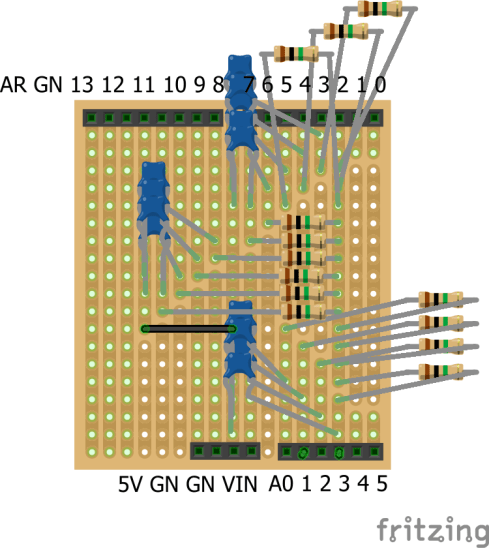
Once again it looks complex in this form, but the basic idea is that there is a 1M resistor between each sensor pin (3-11, A0-3) and pin 2, and a 150pF capacitor between each sensor pin and GND.
Unfortunately due (apparently) to a bug in the design information for the first Arduino, the pins don’t fully match up with breadboard or stripboard, so a slight “hack” is required as follows – four of the legs need bending slightly to make them fit.


Warning: under no circumstances should this be plugged in and powered up at this stage – there are no breaks in these tracks, so this would link the pins on both sides together!
The pattern for track breaks for this is as follows. Note there was one mistake I found after making this, and I added an extra GND track to make soldering four of the capacitors easier. The modifications are indicated with a red X in the photo below.

The finished board looks like this.

One last thing. I didn’t allow for a speaker on this board as I’m aiming to add MIDI at some point instead, so for now, I added a wire into pin 12 directly to link, via the 220R resistor, to my speaker.
The Code
The code is exactly as before, except that the SENSOR_THRESHOLD value worked best for me when set at 200 this time.
The full code is listed in the previous post – Arduino Touch Piano.
Closing Thoughts
The extra capacitors really did make a difference, but it would have been extremely difficult and unreliable on a breadboard.

The final “piano” isn’t too bad – although cutting that copper tape is fiddly and it creases really easily as you can see. I also initially just stuck it over the exposed wires, but I hadn’t realised that the adhesive on the back meant that it essentially had an insulating layer between the copper and the wire. Instead I poked the wires through and soldered them to the copper.
Here is the finished result. This is now probably worth turning into a MIDI keyboard.
Kevin

 Simple DIY Electronic Music Projects