As I mentioned in Forbidden Planet “Krell” Display – MIDI Notes I’m building a simple (in function, not in execution it would seem) MIDI note display out of my Forbidden Planet “Krell” Display.
The first attempt showed there is potential, but I was rapidly reaching the limits of what an Arduino could do for me using the off-the-shelf common Adafruit_NeoPixel library.
In this part, I’ve taken forward one of the possible optimisations and I’ve split the display up into separate strips of LEDs. It seems to work a lot better.
Warning! I strongly recommend using old or second hand equipment for your experiments. I am not responsible for any damage to expensive instruments!
If you are new to Arduino, see the Getting Started pages.
Parts list
- Completed Forbidden Planet “Krell” Display.
- Arduino Nano or Uno.
- MIDI Interface, e.g. DIY MIDI Interfaces, Ready-Made MIDI Modules, and so on.
- Breadboard and jumper wires.
The Circuit
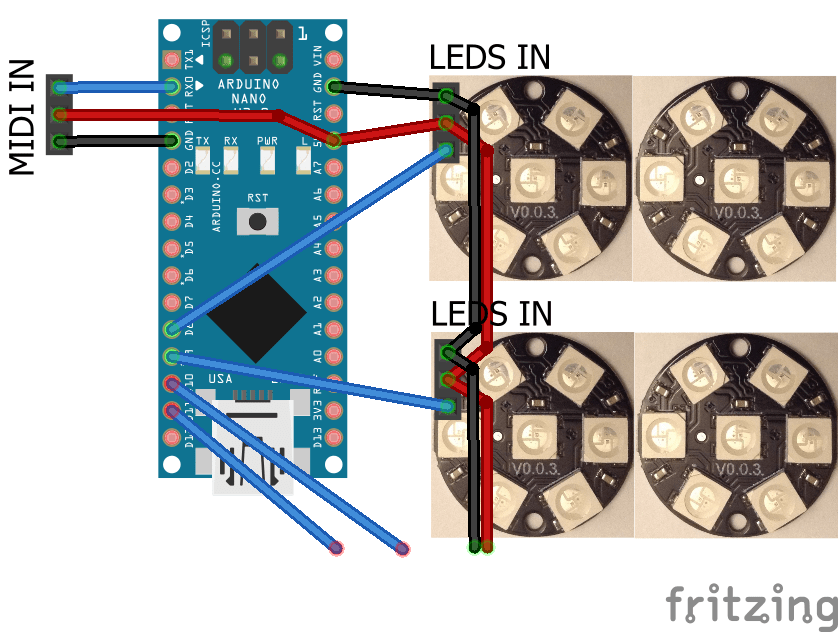
As I mentioned in part 1, there is a significant limitation due to the time it takes to scan all of the LEDs in eight connected rings. For all 56 LEDs it takes almost 2mS and interrupts are completely disabled during that time meaning that MIDI data is getting lost.
But by splitting those rings up into groups of two, I can cut the scanning time down to less than 600uS. This compares favourably with the time it takes to process and store a single byte of MIDI data. At 31250 baud that is around 320uS and one character can be stored within the UART hardware while another character is being received.
Consequently, each pair of LED rings is now connected to its own Arduino GPIO pin. I’m using pins D8-D11 for my four rings.
The Code
A lot of the code is similar to the prevous post but I’ve had to add in an additional layer of abstraction to cope with the fact that the led array is now spread over four separate Adafruit NeoPixel controls.
#define LED_BLOCK 5
#define LED_RINGS 8
#define LED_COUNT (LED_BLOCK*LED_RINGS)
#define STRIP_BLOCK 7

int ledpattern[LED_BLOCK] = {1,0,5,4,3};
int leds[LED_COUNT];
int ledState[LED_COUNT];
bool ledUpdate;

#define NUM_STRIPS 4
int ledPins [NUM_STRIPS] = {8,9,10,11};
int stripCounts [NUM_STRIPS] = {2,2,2,2};
#define STRIP_FORMAT (NEO_GRB + NEO_KHZ800)
Adafruit_NeoPixel *strip[NUM_STRIPS];
Now, I’m using an array of NeoPixel objects, which will be dynamically created as part of the startup routines. There is the ability to define the pin and number of rings per strip too. In the first version I had three strips defined of 2, 4 and 2 rings respectively, but the 4-ring strip was still causing lost notes. Eventually I settled on four pairs and that seems to work.
Initialising the real pin numbers is a little more complicated now as each strip has to restart from 0 when mapping my 5 LEDs over to the 7 physical LEDs per ring.
Each strip is initialised as follows:
  int blockstart = 0;
  for (int i=0; i<NUM_STRIPS; i++) {
    strip[i] = new Adafruit_NeoPixel (STRIP_BLOCK*stripCounts[i], ledPins[i], STRIP_FORMAT);
    strip[i]->begin();
    strip[i]->show();
    strip[i]->setBrightness(50);

    if (i > 0) {
      blockstart += stripCounts[i-1];
    }
    for (int j=0; j<stripCounts[i]; j++) {
      for (int k=0; k<LED_BLOCK; k++) {
        leds[LED_BLOCK*(blockstart+j) + k] = ledpattern[k] + STRIP_BLOCK*j;
      }
    }
The leds[] array is still a single array with an entry for each “virtual” LED (i.e. one of each of my 5 in use LEDs per ring) and it still has to be initialised with the pattern of real LEDs. This has the benefit that the core interface to the LEDs still gives the impression of a single list of LEDs in a single virtual strip. The only slightly more complicated bit is when it comes to updating the strips from the internal record of which LEDs are on or off.
I know have a new function to scan a single strip
int startled;
void scanOneStrip (int ledStrip) {
  if (ledStrip == 0) {
    startled = 0;
  } else {
    startled += LED_BLOCK * stripCounts[ledStrip-1];
  }
  int numleds = LED_BLOCK * stripCounts[ledStrip];
  strip[ledStrip]->clear();
  for(int i=startled; i<startled+numleds; i++) {
    if (ledState[i]>0) {
      strip[ledStrip]->setPixelColor(leds[i], strip[ledStrip]->Color(80, 35, 0));
    }
  }
}
The trick here is to calculate the correct starting LED in the virtual array for this strip and then act accordingly.
There is one dependency that it would be nice to get rid of though – this assumes that each strip will be scanned in order – it calculates the start LED based on the cumulative addition of the strip lengths so far. If this is called out of order, it will probably break.
The controlling function presents the same interface as before, but now allows for repeated calls to scan each strip in turn. Remember a key point of doing things this way was to allow the strip updating to return to allow more MIDI message processing inbetween scanning each strip.
int currentStrip;
void scanStrip () {
  if (ledUpdate) {
    if (currentStrip < NUM_STRIPS) {
      scanOneStrip(currentStrip);
      currentStrip++;
    } else {
      ledUpdate = false;
      currentStrip = 0;
    }
  }
}
Notice how the ledUpdate flag is only cleared once all strips have been scanned.
One indication of how much better this approach is, is that I’ve been able to implement a note count – I now keep track of the number of NoteOn vs NoteOff messages for each note, meaning that the lights won’t go out whilst a note is still hanging on. If there were any issues with stuck notes now, these counters would get out of sync very quickly (which they were doing when I tried to have one strip of four rings – hence going down to two).
I’ve kept the global inactivity timer though, just in case.
Closing Thoughts
Whilst obviously a fair bit more complicated both in code and wiring, I was surprised at how well this seems to work.
In the video you can see my Lo-Fi Orchestra arrangement of Sky’s Toccata and it is possible really start to see the shape of the music in the display.
Still completely impractical of course – I mean I’m attempting to map 12 musical “units” (of pitch) onto a display that has 10 display “units” (of LEDs) so it isn’t a natural fit.
But it does now seem to work, and I feel now that if required, and power limits not withstanding, several more pairs of rings could be added each with their own GPIO driver pin and performance ought to keep up fine.
So the question is – do I keep trying other solutions or move onto something else…
Kevin

 Simple DIY Electronic Music Projects