Now that I’m doing more messing around with EuroRack style modules, I was on the lookout for a simple means of testing them “on the bench”.
As I was scanning around, for different ready-made containers I might be able to use, I settled on the spare plastic cake boxes we have lying around. These often come containing small, pre-wrapped cakes from budget supermarkets and I use them all the time for storage of components, projects, collections of parts I’ve just bought for something, and so on.
On measuring them, I decided I could probably get 30-36HP worth of EuroRack modules in one of those, with a depth of around 50-60mm depending on the exact box I’m using.
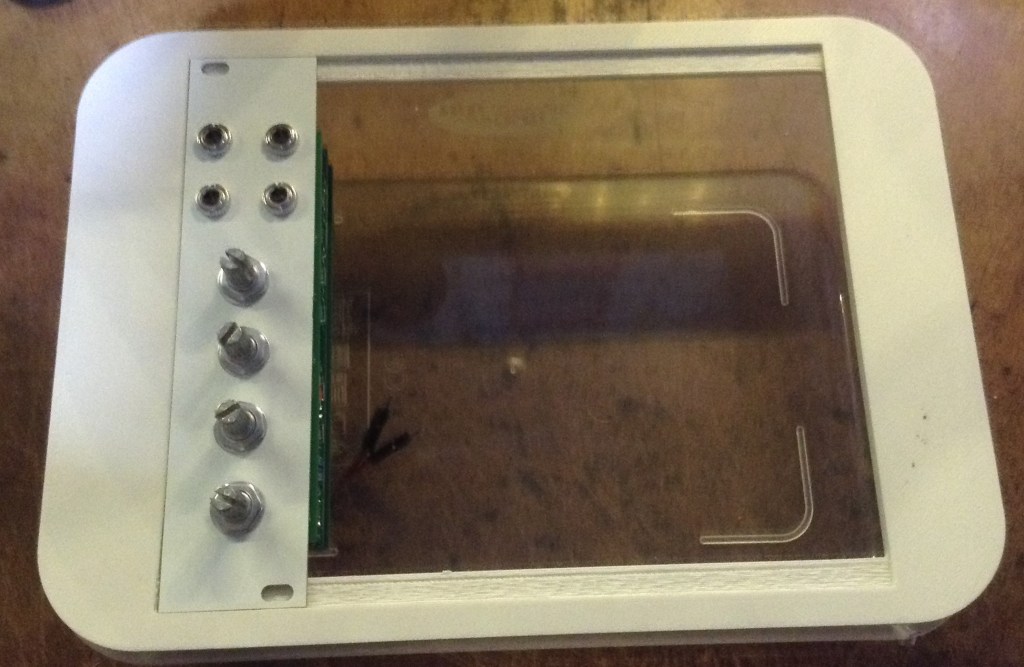
All it really needs is a lid to mount the modules (and power of course). This is the result of that train of thought!
Warning! I strongly recommend using old or second hand equipment for your experiments. I am not responsible for any damage to expensive instruments!
If you are new to electronics, see the Getting Started pages.
The Cake Box
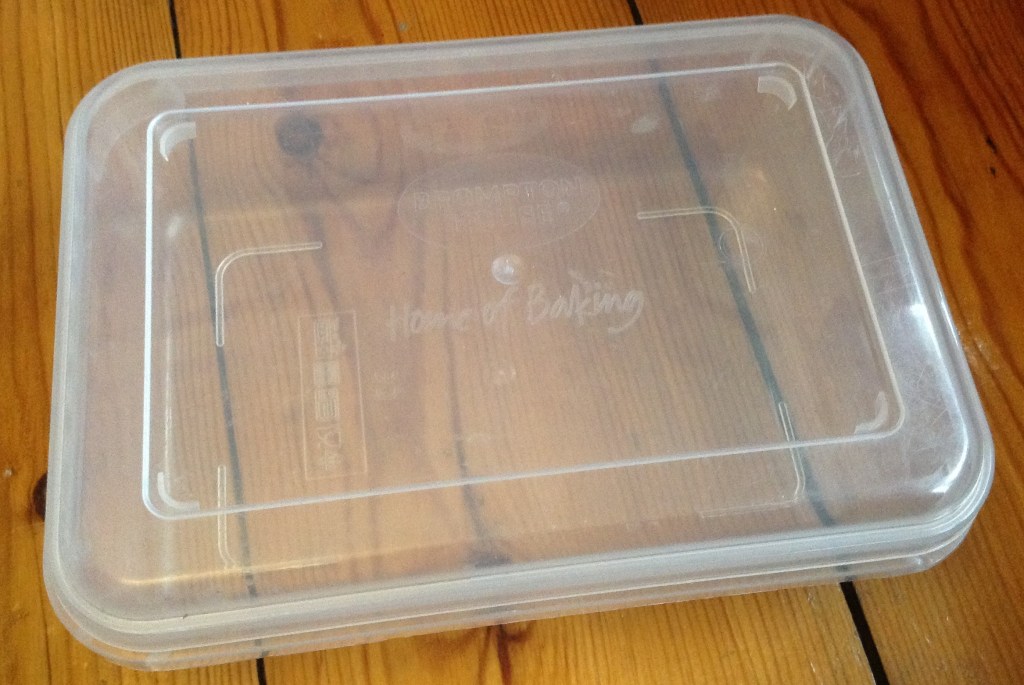
The box itself has the following basic (approximate) dimensions:
- H: 60 or 70mm depending on type of box.
- W: 145mm
- L: 205mm
The inner, usable dimensions are more like:
- H: 50 or 60mm
- W: 130mm
- L: 190mm
There is a very slight tapering of the sides, but not much.
More significant are the rounded corners, which seem to have an approx 20mm radius to them.
3D Print Design
The idea is to 3D print a tight-fitting lid with supports for a EuroRack module. The key dimensions I’m working to are as follows:
- Frame size: 139x199mm (including corners).
- Corner radius: 20mm.
- Thickness of the frame: 2mm (added to the above size).
- Frame height: 10mm.
The opening for EuroRack modules will be:
- Main opening: 128.5mm (129.0 might be better – see notes later).
- Support opening: 116mm.
- Length: 30HP or 5.08×30 = 152.4mm.
All of these were found by measurement, experimentation, and a test print of the frame only.
While I’ve incorporated a lip on which to mount modules, I’ve not included any means of fixing them down. For now, if I want to screw a module in, it will require a small hole drilling in the appropriate place.
OpenSCAD Code
Key to getting this to work in OpenSCAD was finding a way to do the corners. Thankfully, I found a routine for creating segments from polygons and then using the difference of two segments to create an arc which can then be extruded into a 3D shape.
Consequently, the following code is using the sector() and arc() modules from: https://openhome.cc/eGossip/OpenSCAD/SectorArc.html
Otherwise it is largely a series of translate()/sector() or translate()/square() statements with a linear_extrude() of the whole thing to the appropriate height.
f_th = 2.0;   // frame thickness
f_w = 139.0;  // inner width inc corners
f_l = 199.0;  // inner length inc corners
f_c = 20.0;   // inner corner radius
f_h = 10.0;   // frame height
rim = 1.5;    // gripping rim - inc rim_th
rim_h = 2.0;
rim_th = 0.5;

er_l = 5.08*30; // 5x6HP
er_w = 128.5;   // Eurorack module length (height)
er_h = 116.0;   // ... less overlap

res = 100; // resolution of the curves

difference() {
    frametop (f_th,f_c,f_w,f_l);
    translate([(f_w-er_w)/2,(f_l-er_l)/2,-0.1])
        cube([er_w,er_l,f_th+0.2]);
}

translate([0,0,f_th]) {
    difference() {
        frametop (f_th,f_c,f_w,f_l);
        translate([(f_w-er_h)/2,(f_l-er_l)/2,-0.1])
            cube([er_h,er_l,f_th+0.2]);
    }
}

frame (f_h,f_c,f_th, f_w, f_l);
translate([rim,rim,f_th*2])
    frame (rim_h,f_c-rim,rim_th, f_w-rim*2, f_l-rim*2);

module frametop (th,c,w,l) {
    linear_extrude(th) {
        translate([c,c,0])
            sector(c, [180,270], fn=res);
        translate([w-c,c,0])
            sector(c, [270,360], fn=res);
        translate([w-c,l-c,0])
            sector(c, [0,90], fn=res);
        translate([c,l-c,0])
            sector(c, [90,180], fn=res);
        translate([c,0,0])
            square([w-2*c,l]);
        translate([0,c,0])
            square([w,l-2*c]);
    }
}

module frame (h,c,th,w,l) {
    linear_extrude(h) {
        translate([c,c,0])
            arc(c, [180,270], th, fn=res);
        translate([c,-th,0])
            square([w-2*c,th]);
        translate([w-c,c,0])
            arc(c, [270,360], th, fn=res);
        translate([w, c, 0])
            square([th,l-2*c]);
        translate([w-c,l-c,0])
            arc(c, [0,90], th, fn=res);
        translate([c,l,0])
            square([w-2*c,th]);
        translate([c,l-c,0])
            arc(c, [90,180], th, fn=res);
        translate([-th,c,0])
            square([th,l-2*c]);
    }
}

// Taken from https://openhome.cc/eGossip/OpenSCAD/SectorArc.html
module sector(radius, angles, fn = 24) {
    r = radius / cos(180 / fn);
    step = -360 / fn;

    points = concat([[0, 0]],
        [for(a = [angles[0] : step : angles[1] - 360])
            [r * cos(a), r * sin(a)]
        ],
        [[r * cos(angles[1]), r * sin(angles[1])]]
    );

    difference() {
        circle(radius, $fn = fn);
        polygon(points);
    }
}

module arc(radius, angles, width = 1, fn = 24) {
    difference() {
        sector(radius + width, angles, fn);
        sector(radius, angles, fn);
    }
}
The result is as follows.

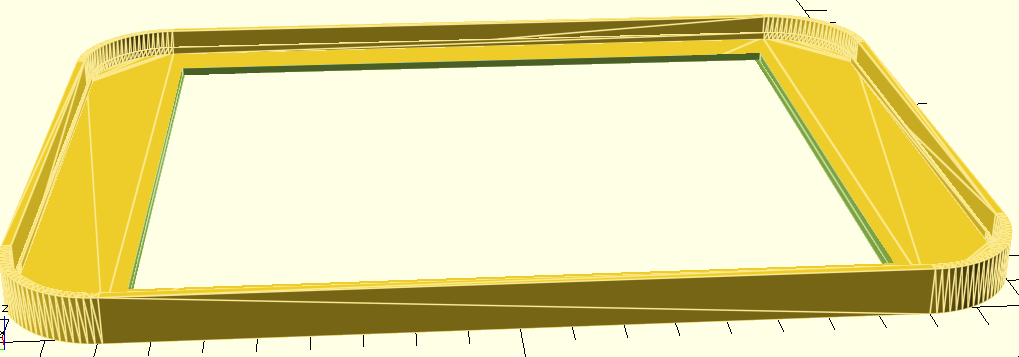
I’ve attempted to include a “rim” that might, given some experimentation, be able to grip the rim of the original box a little like the original lid did, but I’m not convinced at present it is really working.
Also, the EuroRack module size is a little too exact at 128.5. This works ok for me, with no other means to secure modules (this was just for testing) but if it was necessary to more freely be able to insert and remove modules, then this should probably be increased to 129.0.
It is, of course, also possible to give the whole thing more height by adjusting the frame height parameter. But it is probably easier to use one of the larger depth boxes if one can be found.
Closing Thoughts
I’ve printed one and am using it, so see no need to print another for now. But if I did then I’ll probably increase the size of the module opening so they aren’t such a tight fit.
I’d also like to consider getting some M3 compatible screw holes in place. I seem to recall an M3 bolt requires a 3.2mm diameter hole in a panel, so maybe a 3.0mm or 3.1mm hole would do the trick, following appropriate EuroRack spacings.
Alternatively, I could attempt to incorporate something like these 3D printable EuroRack rails: https://www.printables.com/model/334520-modular-eurorack-rails
I’ve printed mine in white as I had some blank EuroRack 6HP and 12HP panels made from white PCBs (the design for those can be found on GitHub here) to match my NiftyCASE.
Now I just need to do something about power…
… Update: I did something about power.
Kevin

 Simple DIY Electronic Music Projects