This project kicked off from a comment in the “Audio/Midi/DMX using Arduino” Facebook group, where someone wanted to know if an Arduino could receive messages on one channel and change the channel number and send them back out.
The answer is yes and this is how it could be done. I’ve based it on my Arduino MIDI Filter which means it can also act as a simple “merger” too provided that the Arduino isn’t receiving so much data that the MIDI processing gets overloaded.
However if all that is required is a simple “anything on this INPUT channel send to this OUTPUT channel” then there is an option for that too.
Warning! I strongly recommend using old or second hand equipment for your experiments. I am not responsible for any damage to expensive instruments!
These are the key Arduino tutorials for the main concepts used in this project:
- Arduino MIDI Library
If you are new to Arduino, see the Getting Started pages.
Parts list
- Arduino Uno, Nano, etc.
- Either one of the Arduino MIDI Interfaces or a Ready-Made MIDI Modules
- Jumper wires
The Circuit
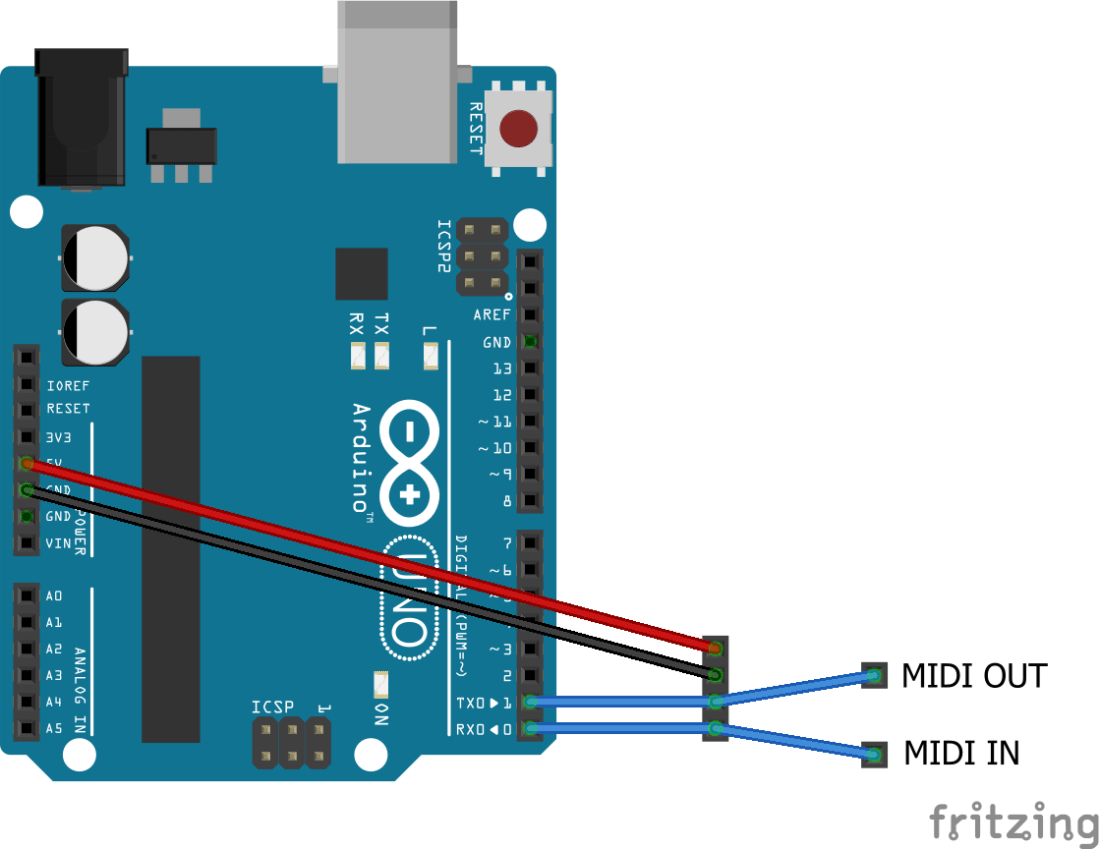
The Arduino will be connected to a MIDI module with an IN going to the RX pin and the OUT going to the TX pin.
To act as a filter/channelizer the MIDI IN port will be connected to the sending device and the MIDI OUT port will be connected to the receiving device.
The Code
This is a slight update on the Arduino MIDI Filter code. The core difference being that after the filter has decided there is a message to send, rather than send it out using the channel it came in on, it sends it out on the pre-configured OUTPUT channel in the code.
There are two modes for this.
For the most basic channel re-writing, all that is actually required is the following:
#include <MIDI.h>

// Set MIDI channel numbers: 1 to 16
#define MIDI_INPUT_CHANNEL 1
#define MIDI_OUTPUT_CHANNEL 2

MIDI_CREATE_DEFAULT_INSTANCE();

void setup() {
  MIDI.begin(MIDI_INPUT_CHANNEL);
  MIDI.turnThruOff(); // Disable automatic MIDI Thru function
}

void loop() {
  if (MIDI.read()) {
    MIDI.send(MIDI.getType(), MIDI.getData1(), MIDI.getData2(), MIDI_OUTPUT_CHANNEL);
  }
}
This code tells the MIDI library to listen only for messages on our required channel. When it receives a message via the MIDI.read() function, it sends it back out using the required OUTPUT channel.
Note that this is using the serial MIDI function, which by default would have automatic MIDI THRU enabled – i.e the MIDI library automatically sends anything received on the MIDI IN straight out to the MIDI OUT port. If we want to change the channel, we don’t want it to do that!
The more sophisticated version includes the option to listen on multiple MIDI channels and send all received messages to the defined MIDI OUT channel. In this way it acts as a simple MIDI merge as well as filter. It is using the same multi-channel filter as used in the Arduino MIDI Filter.
Closing Thoughts
There are still so many possibilities for code that can take MIDI IN, act on it in some way and then send it back out on it’s way.
Some ideas I’ve had include the common, such as “arpeggiators” and so on, but also I’ve wondered about things like MIDI-level transposition; automatic “pitch correction” to quantize playing to certain notes; and turning a keyboard into a micro-tonal keyboard using pitch-bend data for “in-between notes”.
Kevin

 Simple DIY Electronic Music Projects