After having proved the idea of “music” from Twitter data, I wanted a system that didn’t rely on a PC to download the Twitter data, but that could get it “live”, so I thought this would be something that I could do with my Raspberry Pi Pico and my Pico Wireless pack.
I know there are examples in CircuitPython of doing things with Twitter, so I thought I’d start there. It also happens to be CircuitPythonDay2021, so it seemed fitting to be thinking about this today!
- My previous project used an Arduino to do something similar.
Warning! I strongly recommend using old or second hand equipment for your experiments. I am not responsible for any damage to expensive instruments!
These are the key tutorials for the main concepts used in this project:
If you are new to microcontrollers, see the Getting Started pages.
Parts list
- Raspberry Pi Pico
- Pico Wireless pack from Pimoroni
- Pico Omnibus Dual Expander (optional)
- Raspberry Pi Pico MIDI interface
- Breadboard and jumper wires
The Circuit
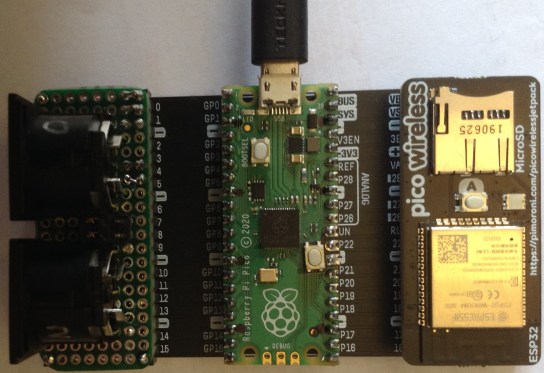
The MIDI interface is connected to UART 0 on the Pico which is connected to both my MIDI interface and the Pico Wireless pack via a dual expander as shown below.
The Code
Pimoroni support Micropython by default for all their products, but it turns out that the Pico Wireless pack is essentially an SPI connected ESP32. This means that the Adafruit adafruit_esp32spi library for CircuitPython will also support the Pimoroni pack if you configure it with the right pins.
esp32_cs = digitalio.DigitalInOut(board.GP7)
esp32_ready = digitalio.DigitalInOut(board.GP10)
esp32_reset = digitalio.DigitalInOut(board.GP11)

spi = busio.SPI(board.GP18, board.GP19, board.GP16)
esp = adafruit_esp32spi.ESP_SPIcontrol(spi, esp32_cs, esp32_ready, esp32_reset)
The example shows how to connect to your Wi-Fi network, using a “secrets.py” file to hold the details of your Wi-Fi network access and your Twitter API developer account details.
In terms of accessing the Twitter API, there isn’t a helper library (that I’ve found so far anyway) like Tweepy for “full” Python, so we’re a bit more on our own.
However, the Adafruit “requests” library can be used (as shown in the Adafruit tutorial) to access Twitter API endpoints. To get all the followers, and their details, for a specific Twitter account, you need to use:
https://api.twitter.com/1.1/followers/list.json?cursor=-1&count=500&screen_name=ScreenName
This returns a response that can be turned into json within Python and handled accordingly. Consequently, the code to pull out the followers and friends from the followers of a single account involves a single call to the Twitter API as follows.
username = 'diyelectromusic'
url = 'https://api.twitter.com/1.1/followers/list.json?cursor=-1&count=500&screen_name=' + username

bearer_token = secrets['twitter_bearer_token']
headers = {'Authorization': 'Bearer ' + bearer_token}

response = requests.get(url, headers=headers)
json_data = response.json()

ids = []
for fid in json_data["users"]:
ids.append(fid)

response.close()

for i in range (0, len(ids)):
    screen_name = ids[i]["screen_name"]
    followers = int(ids[i]["followers_count"])
    friends = int(ids[i]["friends_count"])
    print (screen_name,"\t(", followers, ", ", friends, ")")
From this point I can decide what to do to turn these details into sounds. For this project, I’ve opted to turn the followers into a duration once again, but this time I plan to turn the number of friends into MIDI notes.
Now, MIDI has a range of 0 to 127 for MIDI notes, and most of those are beyond sensible hearing ranges. The number of friends can be pretty large! So I decided to take the number of friends and split that number into 6-bit chunks and use each 6-bit chunk to seed a MIDI note. Then I play all notes for a single friends count at the same time.
Here is the code to do that:
midibytes = []
while (friends > 0):
    midinote = int(friends) & 0x3f
    midibytes.append(24 + midinote)
    friends = int (friends/64)
Basically I extract the bottom 6-bits of the friends count and add 24 to turn it into a MIDI note in the range 24 to 87. Then I divide by 64 to “shift those 6-bits out” of the friends number and keep doing this until all bits have been accounted for, and friends has dropped to 0.
The duration of the note is taken from the follower count. If followers is less than 500, I keep it as it is. If between 500 and 1000 I take the count/2. If over 1000, I take the count/4.
Then later on I send note on messages for all notes, wait for the required duration (measured in milliseconds), and send note off messages for all notes.
for mid in range (0, len(midibytes)):
    if midibytes[mid] != 0:
        noteOn(midibytes[mid])

time.sleep(delay/1000)

for mid in range (0, len(midibytes)):
    if midibytes[mid] != 0:
        noteOff(midibytes[mid])
For some reason I only seem able to process 20 followers. I don’t know if that is a limitation of the Twitter API itself or a consequence of the shear amount of data being returned per follower. But 20 isn’t a bad number to get an interesting repeating sequence of MIDI.
The code will keep playing this generated MIDI sequence until the Pico is reset, at which point it will go off to the Internet and get a new follower list.
Closing Thoughts
This is quite a nice effect. I have it playing the “Harmo Pan” sound of my MT-32 again, which works nicely for this kind of thing. It is good to have a single system that is capable of getting the data live off the Internet!
I might look into seeing if I can use the Pico to generate some kind of built-in sounds, then it won’t even need a MIDI connection. I could use the PIO for “tone” like functionality or finally look into PWM output for the Pico, which is something that has been on my todo list for a while now.
Kevin

 Simple DIY Electronic Music Projects