I wanted to experiment with different scales and tempos with my LOLShield MIDI Step Sequencer but naturally didn’t want to keep having to recompile and redownload sketches onto the Arduino, so some kind of control was in order.
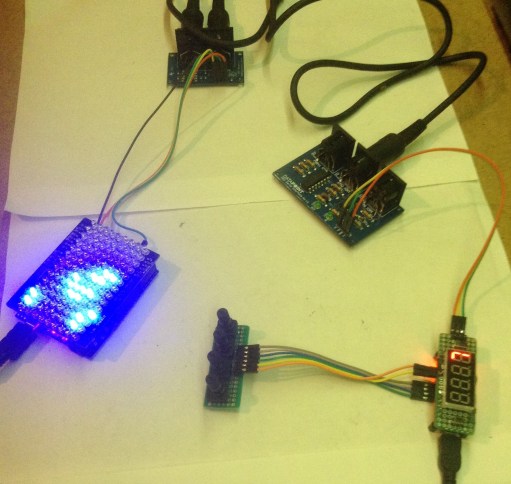
However the LOLShield uses all the IO apart from RX/TX, which are used for the MIDI, but I do have my Arduino MIDI 7 Segment Controller and Simple Potentiometer Breakout so decided to update the code to listen out for MIDI control and program messages and act appropriately.
Warning! I strongly recommend using old or second hand equipment for your experiments. I am not responsible for any damage to expensive instruments!
These are the key Arduino tutorials for the main concepts used in this project:
If you are new to Arduino, see the Getting Started pages.
Parts list
- Arduino Uno
- LOLShield (details here)
- One of the Arduino MIDI Interfaces
- Some kind of MIDI controller (I have my own)
- MIDI module
The Circuit
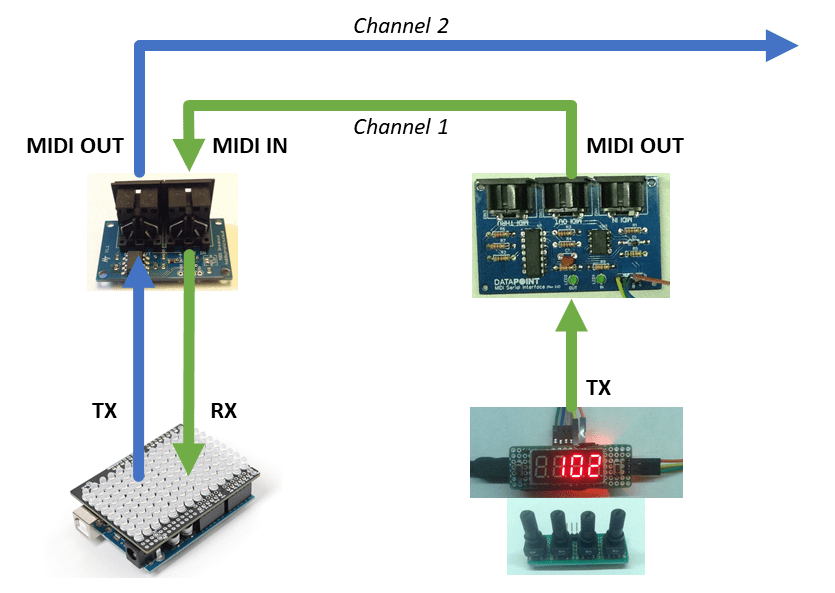
The LOLShield now has to both transmit and receive MIDI from two different devices. It has to receive from the MIDI controller and send to a MIDI sound module/keyboard. In order to keep the MIDI traffic independent I’ve configured it for two different MIDI channels.
I am using two of the Arduino MIDI Interfaces here: one for the LOLShield and one for the MIDI controller. Be sure to get the TX/RX connections the right way round when connecting the MIDI modules – the two shown here have different conventions for wiring them up!
The Code
The main Game of Life code is untouched from before but I’ve updated the MIDI scale handling to allow for several scales to be stored and selected on receipt of a MIDI Program Change message. Having more than a couple of scales starts to put a strain on the memory of the Arduino, so I have to store them using PROGMEM. I’m storing them in a two-dimensional array:
const byte PROGMEM midiNotes[SCALES][MIDI_NOTES] = {
  {
    // Scale 1, of 9 notes...
  },
  {
    // Scale 2, of 9 notes...
  },
  // etc
}
I wanted to be able to control the tempo too, so I updated the delay() to make it selectable based on the value received from a MIDI controller. I chose the value from the modulation wheel (MIDI CC message 0x01), but scaled it down to choose one of 8 values:
tempo = MIDI.getData2() >> 4;
There were a number of issues whilst writing this code that initially caught me out, so have had to be thought about and handled:
- I’ve already mentioned that I have to use PROGMEM for storing the scales.
- When changing scales, I need to be able to send out the noteOff messages from the previous scale before sending out noteOn messages for the new one.
- At slow tempos, using delay() meant that received MIDI messages weren’t being processed quickly enough and were often missed.
- At quick tempos, there were so many notes being transmitted that I think there was another bottle-neck in the MIDI library somewhere that also meant that some received messages were missed.
Once again my simplest solution was to write my own delay() function that waited whilst still processing the MIDI receive queue. I also disabled MIDI Thru functionality so the MIDI Library wasn’t attempting to add extra things to the MIDI sending queue every time it received something.
I looked up a few interesting scales and programmed them in, adding a whole tone scale, diminished, pentatonic, and blues to my original natural harmonic scale. Then I asked a jazz person to suggest some others so have another four rather random but interesting sounding scales to add to the mix, making a total of nine, selectable on MIDI Programs 1 to 9.
Closing Thoughts
This was the first time I’ve had a project both listening to and sending MIDI messages, so it threw up some interesting minor challenges which required a little bit of thought – it took a while to work out why the program change messages seemed to work ok, but it seemed to ignore the control change messages. I’m still not entirely sure I know why one worked and the other didn’t, but it was probably just a symptom of unpredictable behaviour when the two sets of MIDI handling clashed.
The end result is not too bad though and those scales are quite fascinating when used with the right sounds.
I could expand this further to allow the use of several LOLShields to create a much larger game grid, but I think really I’d like to combine the buttons used with the Arduino VS1003 Drum Machine with one of the LED matrix projects to create a simplistic Tenori-on style controller.
Kevin

 Simple DIY Electronic Music Projects