This project is an example of receiving MIDI data. The simplest version of this project uses a MIDI shield that you can buy quite cheaply online.
- In Simple MIDI Monitor – part 2 I build a relatively simple MIDI in interface on breadboard or stripboard, but it is more involved than the few resistors and a MIDI socket that is all that is required to send MIDI.
- In Arduino MIDI Note Monitor I light up LEDs depending on which notes are being played.
Warning! I strongly recommend using an old or second hand keyboard for your MIDI experiments. I am not responsible for any damage to expensive instruments!
These are the key Arduino tutorials for the main concepts used in this project:
If you are new to Arduino, see the Getting Started pages.
Parts list
- Arduino Uno
- MIDI Shield or MIDI in device
The Circuit
When using the MIDI Shield no additional circuitry is required for this project. It will flash the on-board LED on receiving MIDI data. The shield I’m using looks like this one.
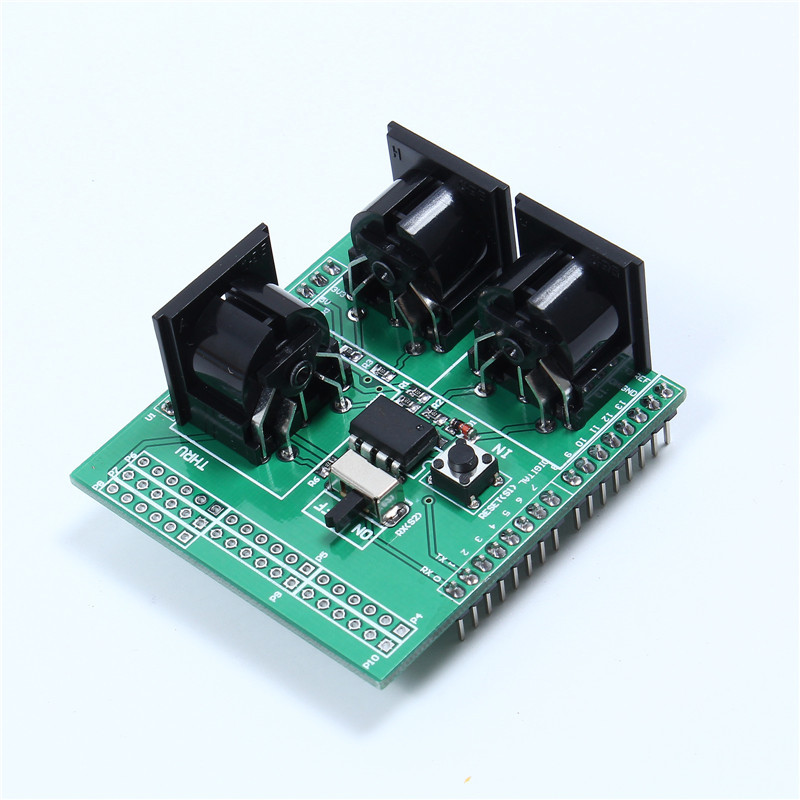
Note that the MIDI Shield has a slider switch to enable or disable the MIDI link. This is required as the MIDI link uses the on-board serial port which is also used for loading programs using the USB link. This means the shield should be “off” when loading a new program, but then turned “on” to start listening for MIDI data.
The Code
This uses the MIDI library once again, but this time to receive MIDI data. There are two ways to receive data, one is to manually check if there is any MIDI data to handle and then handle it accordingly. The other is to set up specific pieces of code to run on receiving specific MIDI messages.
For this simple project, this uses the former – it will check in the loop() function to see if there is any MIDI data received. It initialises the library to listen on all MIDI channels using the MIDI_CHANNEL_OMNI definition. Whenever it receives a MIDI note on event it flashes the built-in LED for a short time.
Note that it would be nice to be able to print out which notes have been received, but as the MIDI link is using the serial port that isn’t possible.
Closing Thoughts
This is the starting point for receiving MIDI data but it would be nice to be able to do more with it, so shortly I’ll look at adding other methods of displaying what we are receiving.
Kevin

 Simple DIY Electronic Music Projects