There are a number of add-ons you can get for Arduino projects that make a rather satisfying sound when activated. This project uses a relay board, which is mean to allow an Arduino to switch a higher power load (such as turning on a light bulb or similar), but I’m just using the click as a kind of percussion instrument.
- In Arduino Reich Relay this idea is expanded up to perform a piece by Steve Reich.
- In Arduino MIDI Relay Drumkit I expand to more relays and add MIDI support.
These are the key Arduino tutorials for the main concepts used in this project:
If you are new to Arduino, see the Getting Started pages.
Parts list
- Arduino Uno or Wemos D1 Mini
- Relay module
- Jumper wires
The Circuit

The relay illustrated above has the signal pin to one side. The relay module I ended up using had the signal pin in the middle of the three, so be sure to check your own module!
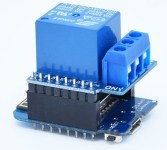
This was also a great project to try with the Wemos D1 Mini as you can get a “relay shield” that sits on top of the board really neatly as shown below, making for a completely self-contained unit.
The Code
The basic idea is that we are just interested in note durations rather than pitch, creating an electronic untuned percussion instrument. As each click essentially has no length to it, we can alter the durations of the notes by changing the length of pause between each note. Also, as the relay clicks on both opening and closing, we just need to change its state to get a click, so that is what I do – keep track of the current state and negate it to create a click at the right time.
I am using the Arduino delay() function to create the pauses. This will essentially halt the running code for the specified number of milli-seconds, so I define some lengths that make musical sense and use them in the code to create my rhythm. A crotchet is 450mS – I’ve chosen that as my rhythm makes use of triplet quavers, so they can be 150mS each. As long as a crotchet = two quavers = three triplet quavers, etc, pretty much any values could be chosen as the base, the shorter the value of a crotchet, the quicker the rhythm will play!
The only other thing to mention is the use of relayValue, which is initially set to LOW and then before every click I set relayValue = !relayValue, so that if it was LOW it is now HIGH, but if it was HIGH it is now LOW.
When playing, the code just cycles through every note in the rhythm and then starts again. You can probably spot the rhythm being played … (the clue is in the title).
Closing Thoughts
It might be fun to get the relay to actually do something rather than just click, but then I’d have to worry about if the relay was open or closed (HIGH or LOW) rather than rely on the clicking of it changing state.
Another fun thing to try might be the use of several relay boards – I could imagine something like Steve Reich’s Music for Pieces of Wood but played on relays…
Kevin

 Simple DIY Electronic Music Projects